

A practical guide / Fonix.AI
AI calling for admissions: enquiry follow-up and counsellor booking
Workflows, exceptions and the questions to ask before deployment.
Make the next counselling conversation useful
AI calling for admissions helps an education team respond to course enquiries, clarify what a student or parent needs and connect them with a counsellor. A useful first call leaves a course reference, speaker role, preferred language and agreed next step. It should not make an admissions decision or invent a fee, scholarship or seat guarantee.
Choose one enquiry flow before launching a campaign. For example, handle requested callbacks about one course and offer a counselling slot when suitable. Keep retention calls, payment discussions and admissions follow-up as separate workflows: they have different purposes and different information requirements.
Fonix.AI supports Indian-language voice conversations and follow-up campaigns. The EdTech use-case page provides industry context. Here the focus is a testable enquiry workflow, including the source record, counsellor booking and exceptions your admissions team needs to own.
Separate an enquiry from an enrolment decision
An enquiry form is not proof that the person wants to enrol immediately. Read the requested course, campus, intake and contact preferences before deciding what to ask. Use an enquiry reference to preserve the distinction between several programmes requested by one household.
Resolve duplicate imports and identify any active counsellor assignment. If an admissions team is already handling the case, follow its ownership policy instead of creating a second appointment. A prompt follow-up can be useful; repeated uncoordinated calls can make the experience worse.
Open by identifying the institute and the automated assistant, stating the requested course and asking whether the person can speak. When the recipient does not recognise the enquiry, record that result and stop. Use the institution's approved contact policy for timing, attempts, recording and preferences; review that policy with the appropriate internal owners before launch.
Identify who is speaking and what they need
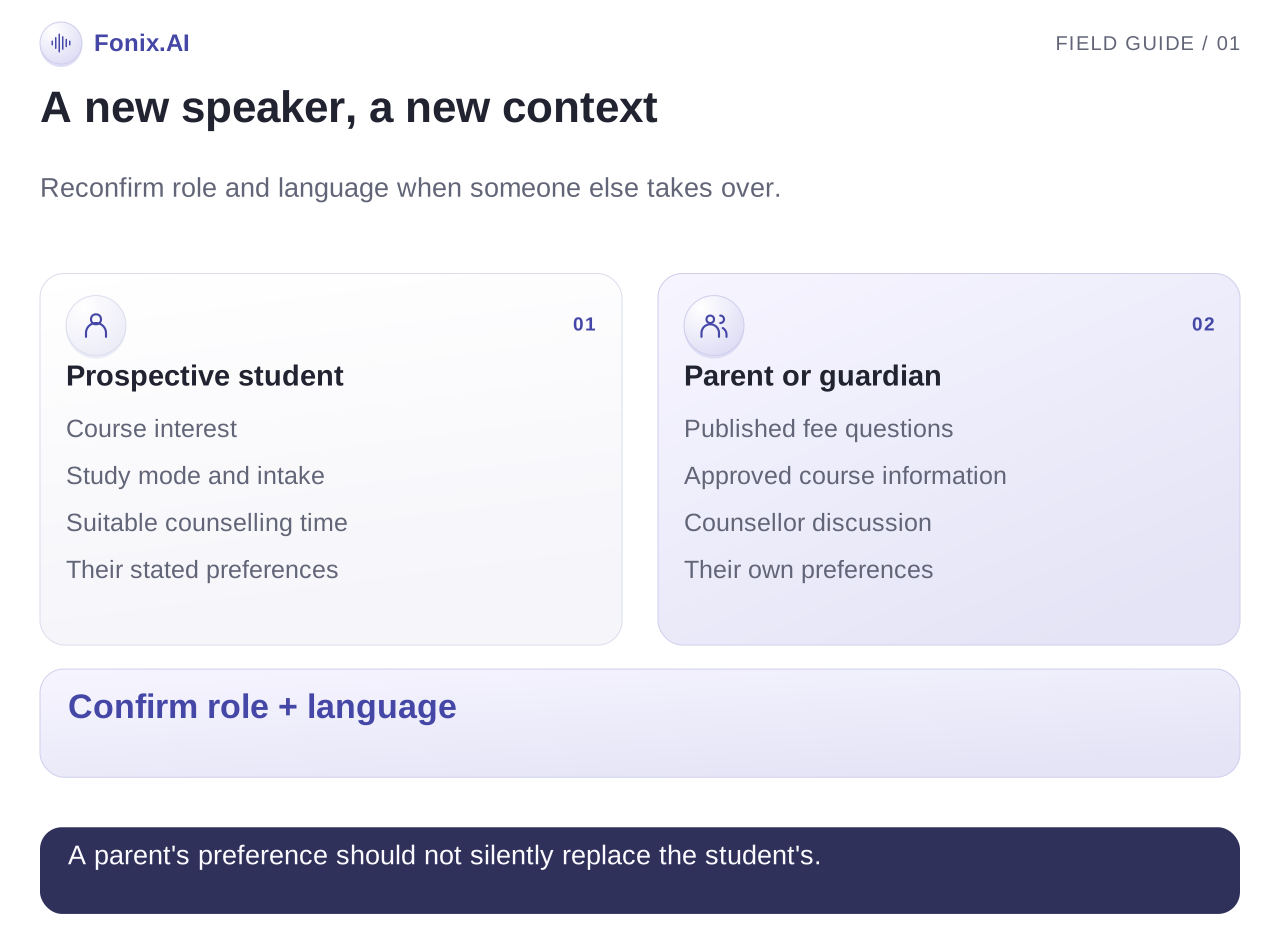
A course enquiry may be answered by the prospective student, a parent or another person using the same phone. Ask who is speaking before discussing personal enquiry details. If the speaker changes during the call, establish the new role and preferred language again.
Keep the first-call questions small and relevant. Course interest, intended intake, mode of study, preferred campus and a suitable counselling time usually provide more useful context than a long generic sales questionnaire. Only collect information required for the agreed task.
| Information | Useful question | Result to preserve |
|---|---|---|
| Speaker | Are you the prospective student or calling on their behalf? | Stated role; do not infer from voice |
| Programme | Which course or batch did you enquire about? | Exact programme reference or unresolved choice |
| Intake | When are you planning to start? | Stated intake or exploratory interest |
| Mode or campus | Which location or learning format suits you? | Preference and acceptable alternatives |
| Next step | Would a counsellor conversation help? | Accepted appointment or callback preference |
If the learner is a minor, use the institution's approved process for involving a parent or guardian and handling personal information. The assistant should not improvise consent or eligibility rules. This guide defines an operational workflow; legal requirements need review for the actual institution and deployment.
Use a current course source and a real counsellor calendar
Make the approved course catalogue the source for programme descriptions, published fees, intake dates, delivery format and official contact routes. Assign an owner and update time. A course PDF from the previous intake should not become the basis for a new fee quote.
Distinguish providing published eligibility information from determining whether a student qualifies. A counsellor or admissions team should review individual qualifications, document issues, financial concerns and exceptions. The assistant can capture the question without offering a decision.
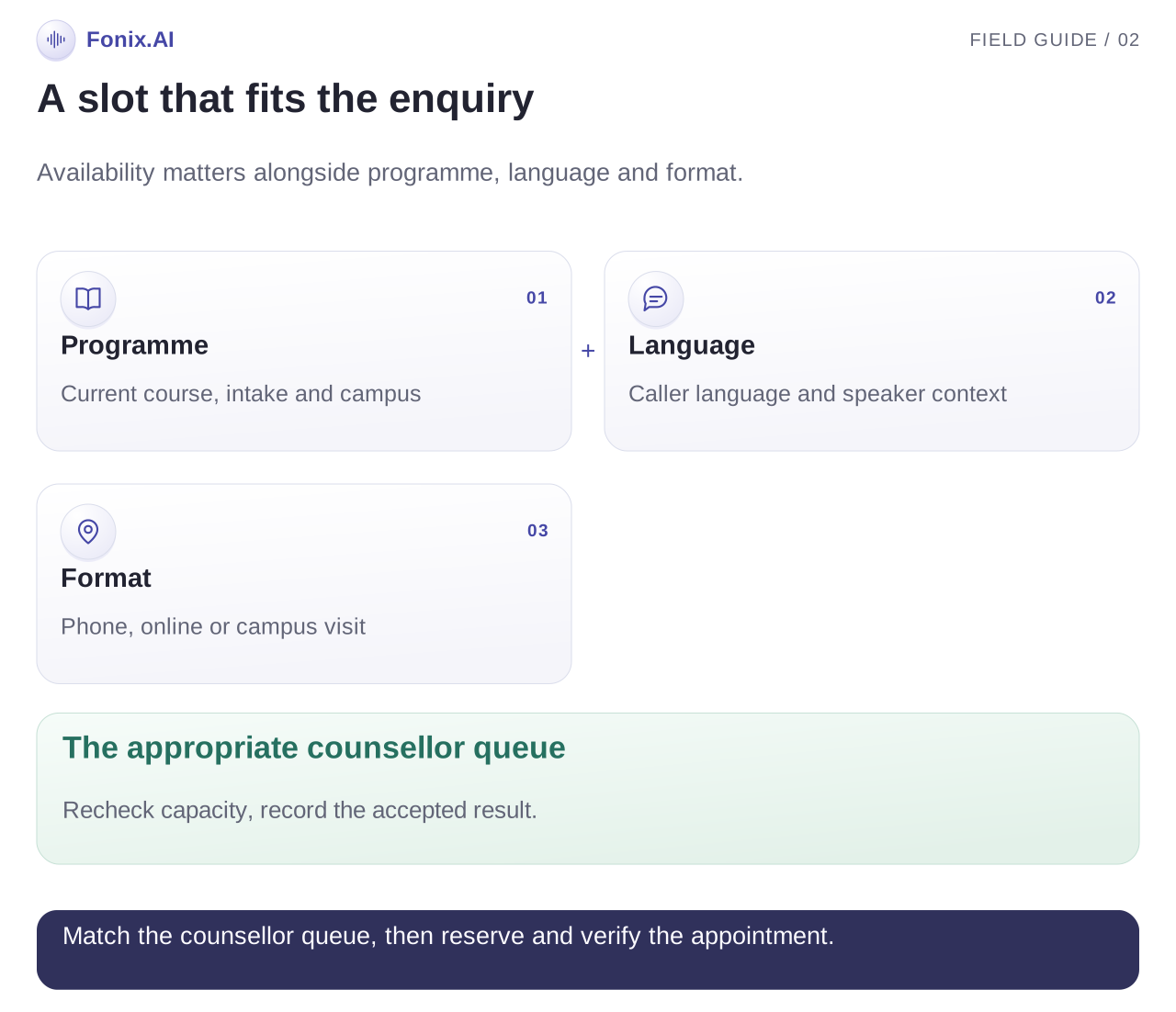
When counselling booking is configured, retrieve genuine slots and confirm the programme, campus or call format, date, time and speaker. Announce the appointment after the system accepts it. If the connection only creates callback tasks, explain that a counsellor will receive the request under the agreed process.
Map programme and language to a counsellor queue explicitly. Test what happens when the appropriate counsellor is unavailable. An appointment with the wrong programme owner is a completed system write but an unsuccessful workflow.
A conversation that changes speaker
This illustrative call concerns a fictional institute and does not represent a student recording or a measured customer result.
Assistant: Hello, I am the automated assistant for Maple Learning. This is about a data analytics course enquiry. Am I speaking with the person who submitted it?
Student: Yes. Weekend batch chahiye. Fees ke liye mummy se baat kar lo.
Assistant: I have noted the weekend preference. Please let me know when your parent is on the line so I can confirm who I am speaking with.
Parent: Haan, main bol rahi hoon. Hindi mein bataiye.
Assistant: Namaste. Main institute ki automated assistant hoon. Aap published fee information chahte hain, ya counsellor ke saath discussion schedule karna chahenge?
The record should reflect the speaker change and the parent's language preference. It should not assume the parent's questions are the student's study preferences. Record any fee question for the counsellor, using the current approved information where available.
Design the exceptions before peak enquiry season
| Situation | Useful response | What to test |
|---|---|---|
| Course name is ambiguous | Ask a short clarification | Similar course names do not select the wrong intake |
| Parent takes over | Confirm role and language again | Conversation context stays accurate |
| Requested intake is closed | Explain the approved status and offer a counsellor | No invented seat availability |
| Fee source is outdated | Route the question with the source reference | No improvised quote or discount |
| Counsellor calendar is unavailable | Create an owned callback under the agreed process | No false appointment confirmation |
| Caller requests no more contact | Apply the preference before another attempt | A later import does not restart the sequence |
| Caller raises distress or a personal concern | Hand over through the institution's process | It does not become a sales objection |
Test interruption, a parent joining halfway through and the same contact appearing twice in the input list. Have counsellors review the saved records to see whether they can begin the next conversation without repeating every question.
Score counselling outcomes rather than calls placed
Track eligible enquiries, conversations with the intended household, counselling requests, confirmed appointments, attended appointments and completed callbacks. Keep opt-outs, wrong contacts and duplicate records visible rather than hiding them inside a conversion total.
Compare attendance among booked appointments and attendance among eligible enquiries. Review programme and language separately, because a strong aggregate can conceal a failing intake or caller group. Count the time from enquiry creation to a useful conversation, distinguishing a ringing attempt from an actual response.
Enrolment may be a later business outcome, but it also depends on course suitability, counselling quality, pricing and the student's decision. A pilot should not attribute every enrolment change to automation. Agree the measurement period, source mix and follow-up window before comparing results.
Run a demo with the admissions team's real questions
Bring one course enquiry, current programme information, counsellor schedules and the questions parents actually ask. Request a normal booking, a speaker change, a closed intake and a failed calendar write. Verify that each result reaches the correct queue.
The multilingual voice evaluation guide helps test the names, course codes and language changes that matter here. The calling software guide covers the broader enquiry pipeline and integration questions.
Request an admissions follow-up demo. Keep the first pilot narrow enough that the counsellors can review every exception and decide what is ready to expand.