
A practical guide / Fonix.AI
AI calling software: a practical workflow and evaluation guide
Workflows, exceptions and the questions to ask before deployment.
An answered call is only the beginning
AI calling software answers or places telephone calls, understands the caller's request and helps execute a defined business workflow. To be useful, it needs more than a convincing voice: it must retrieve the right information, record the outcome and hand over to a person when the request goes beyond its scope.
For an Indian business, a practical starting point is inbound enquiries or follow-up with people who requested contact. The goal might be a qualified enquiry, a confirmed callback or a booked appointment. Choose one of those outcomes before choosing a script, a call volume or a software plan.
Fonix.AI by AntEngage runs voice agents, chat and campaigns in one platform, supporting 14+ Indian languages and cloud or on-premise deployment. This guide explains the workflow to evaluate with the team. Specific telephony, CRM and booking integrations should be confirmed against your existing systems before rollout.
Choose the job before the calling tool
A dialler, a voice broadcast and a conversational agent solve different problems. Start with what the recipient needs to do, not with how many calls the system can initiate.
| Tool | What it does | A sensible use |
|---|---|---|
| Dialler | Connects a call to a person or queue | Staff conduct the conversation and decide the action |
| Voice broadcast | Delivers a recorded message | An announcement does not require a conversation |
| IVR | Routes the caller through configured choices | A small, predictable set of destinations |
| Conversational voice agent | Handles free-form replies within a defined workflow | An enquiry needs clarification, a lookup, a booking or a handoff |
If a contact only needs a short announcement, an interactive agent may add unnecessary cost. If the recipient needs to ask a question or change a booking, a one-way recording will not finish the job. Evaluate both the normal path and the requests you expect to escalate.
Connect the enquiry to a completed next step
1. Start from a trustworthy record
An inbound call starts with the caller's request. Outbound follow-up should start from an enquiry or another agreed contact reason, with the appropriate permission, number and current status. Identify the system that owns this information and keep it current.
Before an outbound attempt, check whether the person has already been contacted, opted out or completed the task. A fresh campaign upload should not erase those facts. Agree who maintains contact rules and how updates reach the calling workflow.
2. Define one useful conversation
Write down the agent's job in a sentence: establish the enquiry, ask the agreed qualification questions, then arrange a callback with the right team. Give it the information it can use and the decisions it is allowed to make.
Separate known facts from generated language. Course fees, appointment availability, property inventory and payment status must come from an approved source. When a fact is unavailable, the next action is clarification or handoff, not a plausible guess.
3. Handle the caller's language and timing
Introduce the assistant clearly and establish whether it is a suitable time to talk. Let the caller change language, ask for a callback or request a person. A Hindi opening with English dates and regional place names is a realistic evaluation case.
Fonix supports Indian-language and code-switched speech. Test with your own names, vocabulary and accents, including pauses, interruptions and corrected answers. A polished sample call does not establish how every call in your campaign will behave.
4. Read, confirm, act
Retrieve information from the agreed system, confirm the caller's choice and then perform the permitted action. Announce a booked meeting or appointment only after the destination system confirms the write. If the write fails, retain an explicit pending outcome and offer the agreed alternative.
For a callback, establish who will receive it and what time can genuinely be offered. For lead qualification, capture the useful answers and hand them to the appropriate team. Do not turn an uncertain answer into a stronger sales signal merely to improve a dashboard metric.
5. Finish with a usable outcome
Store the request, relevant answers, agreed next step, action result and handoff reason. A transcript is useful evidence, but it is not a substitute for a record that tells the team what to do next.
Use explicit statuses such as callback requested, booking confirmed, handoff pending, not interested or unresolved. These are illustrative categories, not a published Fonix API contract. Agree how they map into your actual CRM and which person owns each pending task.
A follow-up example with an honest handoff
This is an illustrative enquiry call, not a customer recording or a conversion claim. Assume a prospect has requested contact about a product demonstration.
Assistant: नमस्ते, मैं आपकी demo enquiry के बारे में automated assistant बोल रहा हूँ। क्या अभी दो मिनट बात कर सकते हैं?
Caller: अभी नहीं, कल afternoon call करना.
Assistant: ठीक है। आपकी preferred language Hindi है या English? मैं callback request में दोनों details जोड़ दूँगा.
Caller: Hindi. कल तीन बजे के बाद.
Assistant: मैंने Hindi में, कल तीन बजे के बाद callback की preference note की है। हमारी team availability confirm करेगी।
The assistant records a requested time, not a guaranteed appointment. If the workflow can retrieve a real team slot and reserve it, it can instead confirm the booking after a successful response. The wording follows the action result.
A useful handoff tells the receiving team the enquiry source, preferred language, requested callback window, relevant qualification answers and any unresolved question. Send only information needed for the task through the configured system. Assign responsibility so the handoff does not end in an unattended queue.
Build retries around state, not repetition
| Failure or interruption | Workflow response | What to verify |
|---|---|---|
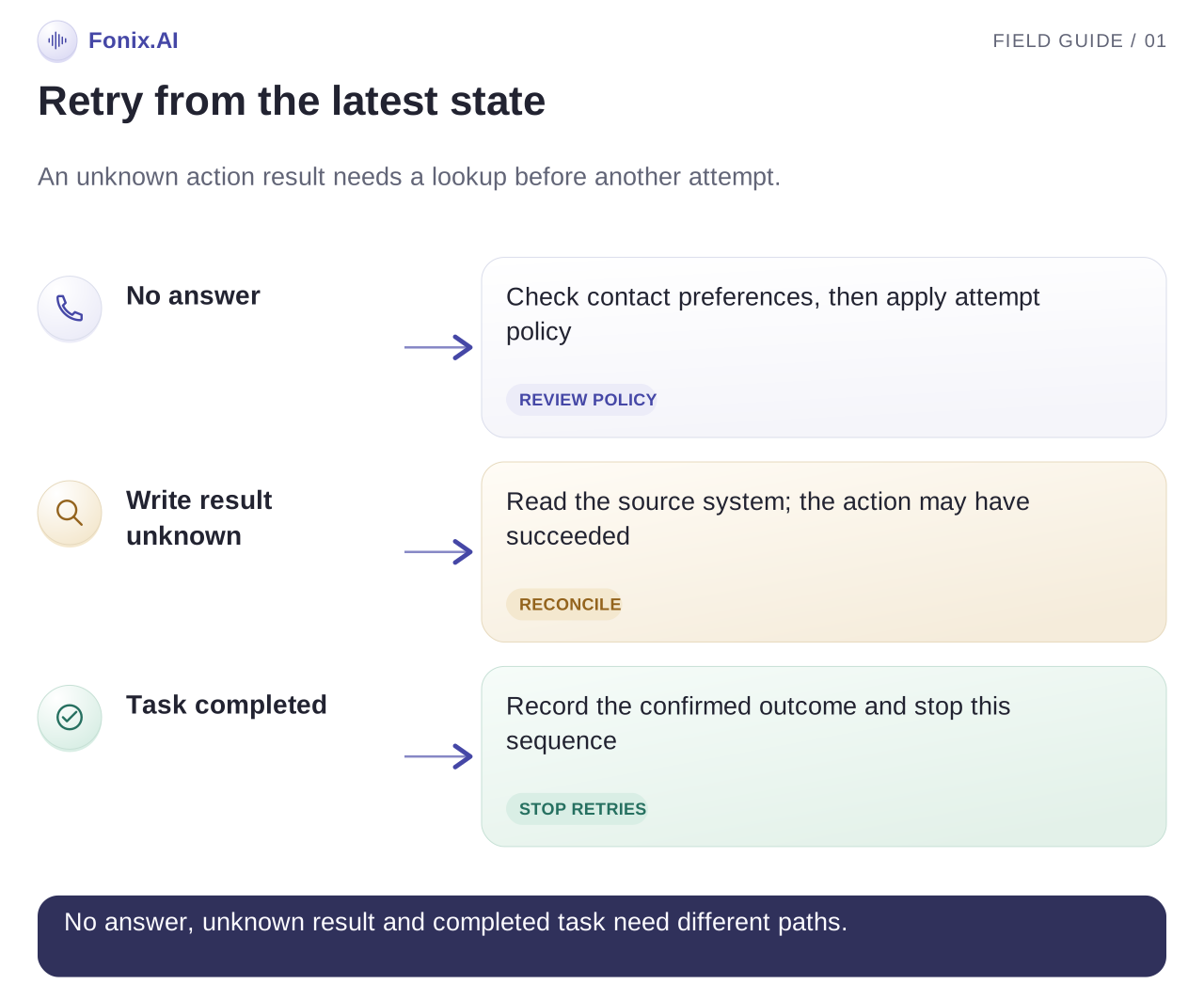
| Call is unanswered | Apply the agreed attempt policy | Attempts stop at the configured limit |
| Caller requests a later call | Record the preference and check scheduling rules | The request is not treated as a completed sale |
| Caller opts out | Update the suppression source | Later imports do not reintroduce the contact |
| CRM is unavailable | Keep an explicit pending state and an owner | An update is not reported as saved when it failed |
| Action times out | Reconcile the destination record before retrying | A retry cannot create a duplicate booking |
| Caller disputes a fact | Retrieve the approved record or escalate | The agent does not invent an explanation |
| Caller wants a person | Transfer or assign a callback | The receiving team has context and responsibility |
For write actions, agree how duplicate requests are detected. A request identifier or another supported reconciliation mechanism can distinguish a retry from a new task. Demonstrate the actual integration's behaviour; do not assume that a timeout means the first write failed.
Pilot the system with failed lookups, interruptions and contradictory answers. If every test ends in success, you have not tested the operational boundaries.
Check integrations and deployment responsibilities
| Connection | Questions to resolve before rollout |
|---|---|
| Business number and telephony | Which number is used, how are calls routed and what is the fallback? |
| CRM or enquiry source | Which fields can be read and updated, and how quickly do changes propagate? |
| Calendar or booking system | Can the integration reserve a slot, detect a conflict and reconcile a timeout? |
| Confirmation channel | What triggers a message, what is its delivery status and where are failures recorded? |
| Human team | Who accepts transfers and callbacks, and what happens outside staffed hours? |
| Reporting | Can the team trace an outcome back to its call and destination record? |
Fonix.AI can be deployed in the cloud or on-premise. Evaluate the complete system boundary: voice processing, telephony, integrations, records, staff access and ongoing maintenance. An on-premise model does not, by itself, make every connected service local.
Ask the team to confirm available integrations and show the exact deployment you need. Assign owners for scripts, approved knowledge, contact policy, support and source-system changes. These responsibilities continue after the first live call.
Compare cost per outcome, not just per minute
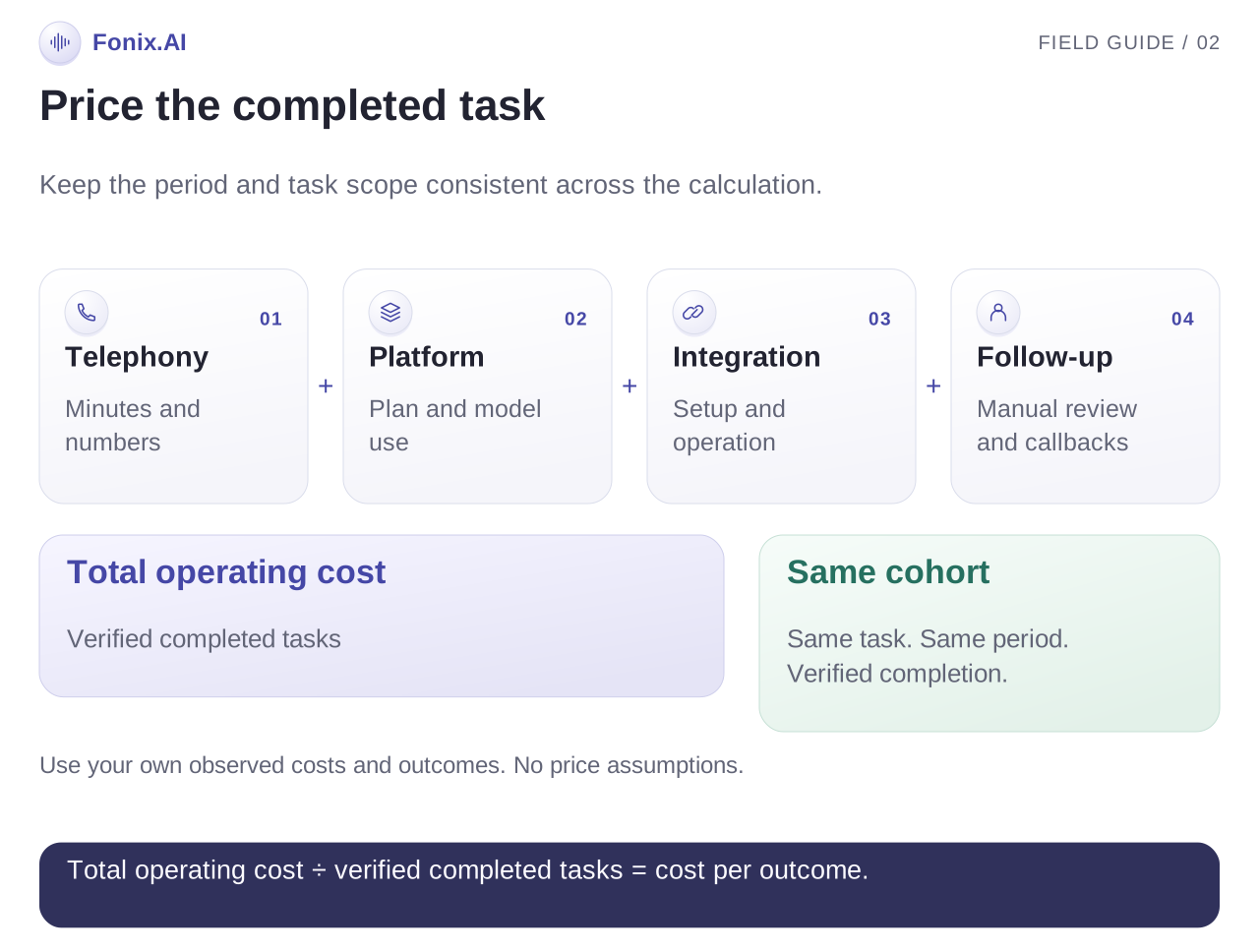
A per-minute quote is an input to the budget, not the final cost of the workflow. Ask what is included: platform access, business numbers, telephony, connected or attempted minutes, setup, integration work, support and recording storage where relevant.
Use a worksheet with your own expected volumes. Do not apply one estimate to both answered calls and unanswered attempts without checking how they are billed.
| Budget input | What to establish |
|---|---|
| Connected call minutes | Expected answered calls multiplied by their average connected duration |
| Other billed attempts | The provider's billing rules for unanswered, failed and partial calls |
| Fixed charges | Platform, numbers and any agreed recurring support |
| One-time work | Setup and integration costs, with a clear scope |
| Human handling | Time spent on transfers, exceptions and callbacks |
| Completed outcomes | Verified bookings, qualified handoffs or completed callbacks |
For the same reporting period, divide the total included operating cost by the number of verified completed outcomes. State what the total includes and keep quality measures beside the calculation. A low cost per outcome is not useful if the booking is wrong or the callback never happens.
Review current Fonix pricing and ask for estimates at both pilot volume and expected operating volume. Cloud and on-premise deployments have different cost structures; request a scoped quote rather than infer one from a generic rate.
An evaluation checklist for the live demo
Bring one real workflow, a sample record without sensitive customer data, preferred languages and the actions the team needs to complete. Ask the demo to show:
- A normal enquiry with a verified next step.
- A language change and an interruption halfway through the call.
- A source-system lookup that fails.
- An action whose response is delayed or uncertain.
- A request for a human and a callback outside staffed hours.
- An opt-out followed by another attempt or import.
- The final outcome record and the person responsible for any pending work.
Compare the evidence against the work your staff currently do. Launch one bounded workflow, review the unresolved outcomes with the team and expand only when the records and handoffs are reliable.
Questions buyers ask about AI calling software
Is an AI calling agent the same as a dialler?
No. A dialler connects calls; an agent conducts a defined conversation and may retrieve information or trigger actions through configured integrations. Choose based on the task, not the label.
Can it connect to our existing CRM?
Discuss the CRM, access requirements and fields your workflow needs with the Fonix team. An integration must support the specific reads, writes and failure handling required. Do not assume every CRM is available as a ready-made connector.
Can it make calls in Hindi and regional languages?
Fonix supports 14+ Indian languages and code-switching. Evaluate your particular language mix and business vocabulary in a real call. The platform overview explains the broader voice, chat and campaign capabilities.
What should stay with a person?
Requests outside the approved workflow, disputed facts, sensitive judgement and any explicit request for a human need a defined handoff. Agree that boundary before running a campaign.
Evaluate your own calling workflow
Ask the Fonix team to review your workflow. Bring the enquiry source, language requirements, expected volume and one action you want the call to complete. Ask for an integration walkthrough and a demonstration of both success and failure.
Explore the Fonix platform, the clinic receptionist workflow and current pricing as you compare your options.