

A practical guide / Fonix.AI
AI receptionist for clinics: a practical booking and handoff guide
Workflows, exceptions and the questions to ask before deployment.
When the front desk cannot pick up
An AI receptionist for clinics answers routine appointment enquiries, checks clinic information and helps the caller reach a clear next step. A useful deployment connects that conversation to the clinic's actual scheduling process. The appointment is confirmed only when the booking system confirms it; a clinical question or an unresolved request goes to a person.
Start with one coverage gap: calls outside opening hours or calls that overflow while the receptionist is occupied. Keep the existing front desk involved in the exceptions. This gives the team a manageable pilot and a concrete question to measure: which enquiries reached a confirmed booking or a completed callback?
Before changing anything, review a week of call records. Separate unanswered calls, repeated attempts from the same caller, scheduling enquiries and requests that require a staff member. An unanswered call is a useful signal, but it is not automatically a lost appointment. Use the records to choose a workflow rather than assume every ring represents revenue.
A booking workflow with a clear finish
1. Route the right calls
Decide whether the assistant receives every inbound call, only overflow calls or only calls outside opening hours. Agree how your existing business number will reach the service and what happens if the service is unavailable. Number forwarding, telephony configuration and human transfers should be demonstrated against the setup you intend to use.
Give the assistant an approved clinic-information source: location, opening hours, services, doctor schedules and the appropriate contact route. Assign someone at the clinic to keep it current. An accurate conversation today becomes an inaccurate one when next week's schedule changes without an update.
2. Establish the request and language
Introduce the automated assistant plainly, then ask what the caller needs. An appointment request, a reschedule and a question about opening hours are different tasks. Avoid collecting a full patient history for a simple booking enquiry.
Fonix.AI supports 14+ Indian languages, including code-switched speech. Test the actual language mix your callers use: a Kannada opening, an English doctor name and a Hindi clarification may all occur in one conversation. Language coverage is a reason to test a real call, not a substitute for that test.
3. Read availability from the scheduling source
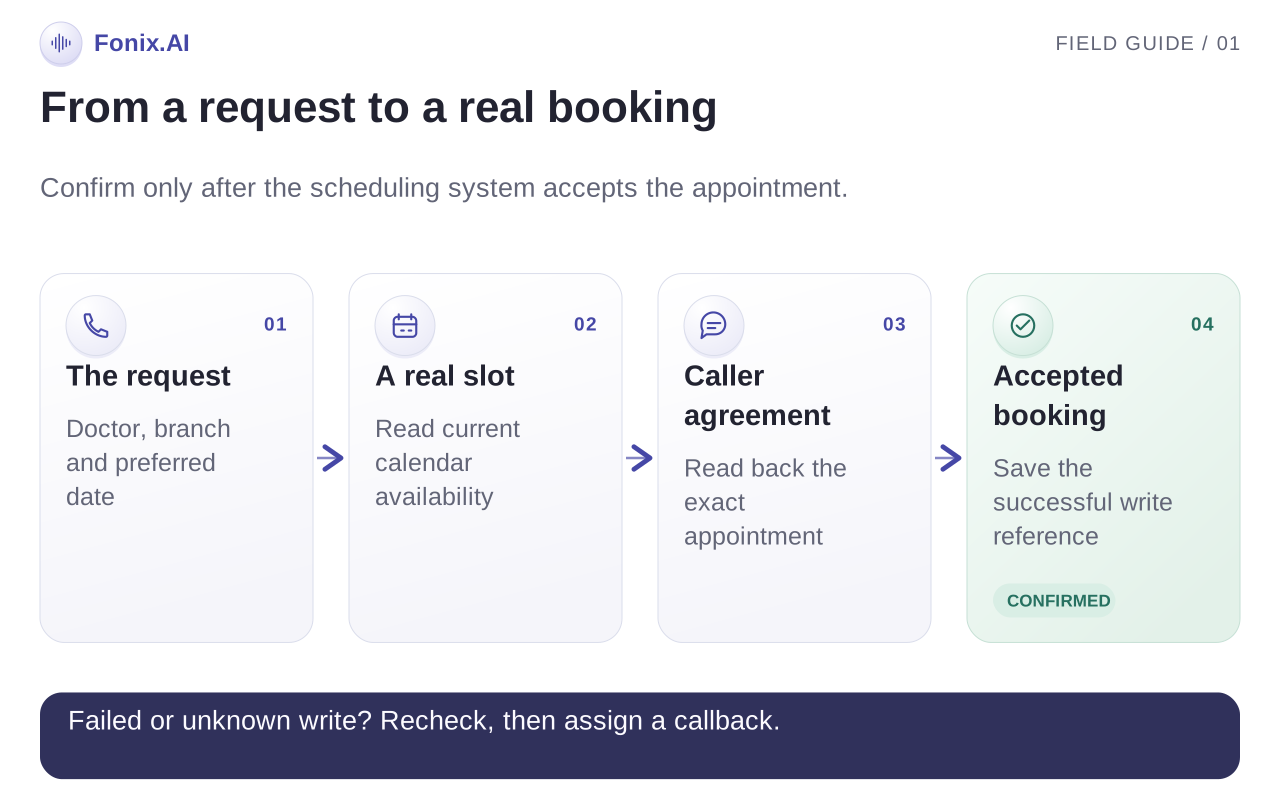
Use the clinic's agreed scheduling system as the source of available slots. Confirm which integration can read availability and which can create, change or cancel a booking. A calendar connection that only reads events is not a complete booking integration.
Offer a small number of valid options, repeat the selected doctor, date and time, and ask the caller to confirm. Account for doctor-specific hours, appointment duration, holidays and branch location. If the availability lookup fails, take a callback request instead of offering a guessed slot.
4. Confirm the booking result
Create the appointment only after the caller agrees to the details. Wait for the scheduling system's successful response before saying it is booked. If a slot becomes unavailable between lookup and booking, explain the change and retrieve another option.
Where a confirmation channel is configured, send the final details through that channel. Confirm its integration and delivery behaviour during setup. An attempted message and a delivered confirmation are different outcomes; the call record should distinguish them.
5. Hand off what needs a person
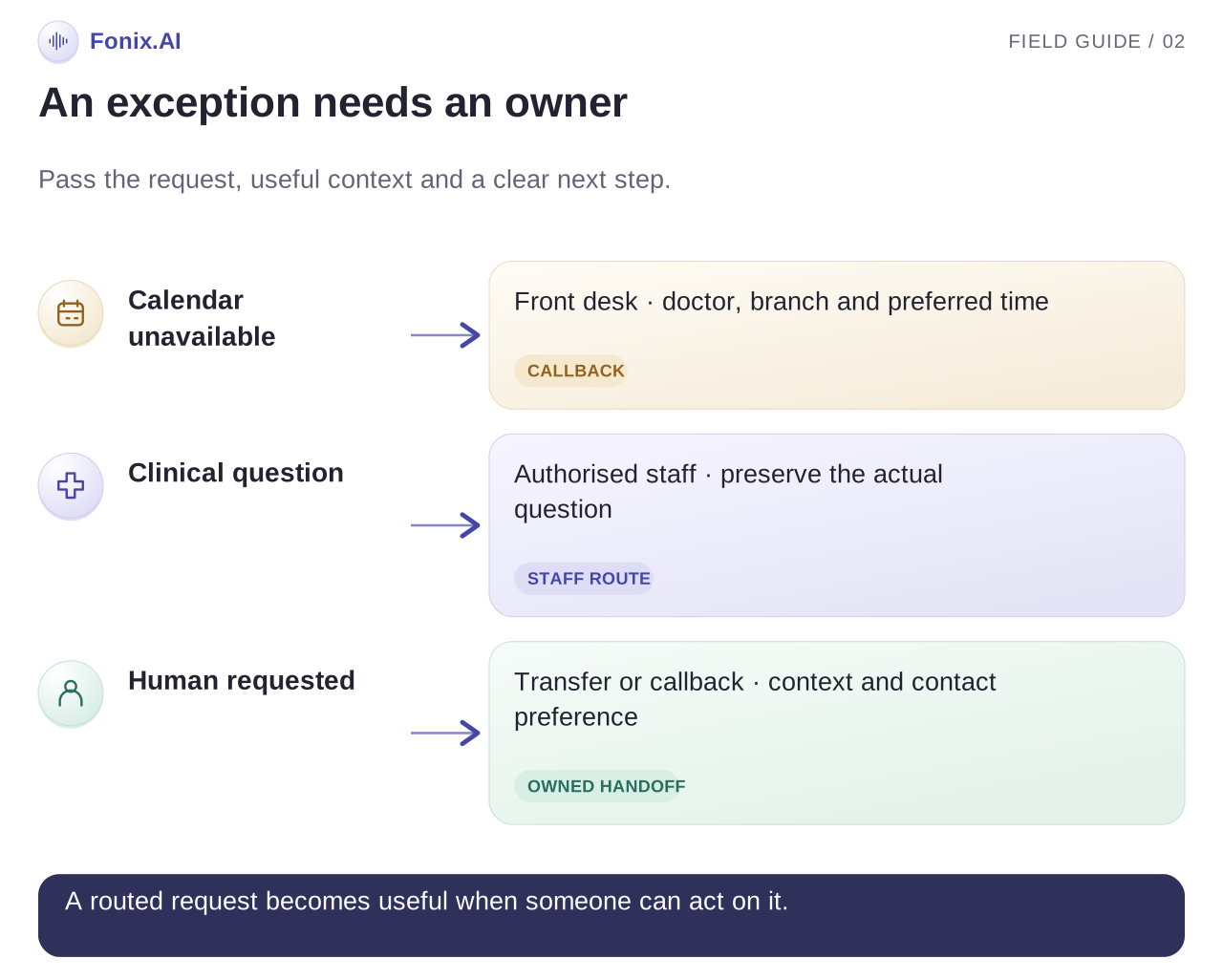
Let callers ask for a human at any point. Agree whether the clinic can accept a live transfer or needs a callback queue, who owns that queue and when it is checked. If nobody is available, explain the next step without promising an unapproved response time.
Keep diagnosis, treatment advice and interpretation of symptoms outside the booking workflow. Use the clinic's approved instructions for urgent concerns and route them appropriately. A receptionist flow should never turn a request for clinical help into a generated medical answer.
What a real conversation should achieve
The following is an illustrative call, not a patient recording or a measured customer result. Assume the configured scheduling source has returned an available Saturday slot.
Caller: ನಮಸ್ಕಾರ, Saturday Dr. Rao appointment ಬೇಕಿತ್ತು.
Assistant: ನಮಸ್ಕಾರ. ನಾನು ಕ್ಲಿನಿಕ್ನ automated assistant. Dr. Rao ಅವರ Saturday available appointments check ಮಾಡುತ್ತೇನೆ.
Assistant: ಬೆಳಿಗ್ಗೆ 11:30 slot available ಇದೆ. ಆ ಸಮಯ ನಿಮಗೆ ಸರಿಯಾಗುತ್ತದೆಯೇ?
Caller: ಹೌದು, book ಮಾಡಿ.
Assistant: ನಿಮ್ಮ ಹೆಸರು ಮತ್ತು callback number ತಿಳಿಸುತ್ತೀರಾ? Booking confirm ಮಾಡುವ ಮೊದಲು details ಮತ್ತೆ ಹೇಳುತ್ತೇನೆ.
The assistant must still collect the agreed booking details, read them back, obtain confirmation and receive a successful booking response. Natural speech is one part of the experience. A correct appointment record is the finish.
Keep a compact outcome record: the caller's request, agreed language, doctor and branch, selected slot, booking reference if created, confirmation status and any handoff reason. Only retain information needed for the task under the clinic's agreed access and retention policies. This is a recommended record structure, not a published Fonix API schema.
Plan the exceptions before going live
| Situation | Useful next step | What to test |
|---|---|---|
| Calendar lookup fails | Explain that availability cannot be confirmed; offer a callback | The agent never invents a slot |
| The selected slot is taken | Refresh availability and ask the caller to choose again | No booking is announced before a successful write |
| Caller wants to reschedule | Identify the existing booking through the approved process | The original appointment is not silently lost |
| Doctor or branch is unclear | Ask a short clarification | A similar name does not produce the wrong booking |
| Caller asks a clinical question | Use the approved handoff route | The assistant does not improvise medical advice |
| Caller asks for a person | Transfer when available, otherwise record a callback | The request is visible to the responsible staff member |
| Call disconnects mid-booking | Check the booking result before a follow-up attempt | Retries do not create duplicate appointments |
Demonstrate these cases in the pilot. A successful scripted call shows that the normal path works; deliberately failing the calendar shows whether the workflow is safe to operate.
What the clinic needs to prepare
Prepare the business-number setup, opening hours, doctor and service information, scheduling source, appointment rules and a named owner for escalations. Bring representative caller phrases in the languages your clinic actually uses. Include spelling variations, interruptions and an unclear doctor name.
Ask for an integration walkthrough using your calendar or hospital system. Which records can be read? Which actions can be written? What identifies an existing appointment? What happens after a timeout? The availability of a particular integration must be confirmed for your deployment; do not assume every hospital system is already connected.
Fonix.AI offers cloud and on-premise deployment. Choose based on the workflow, infrastructure, data-handling requirements and the people who will operate it. An on-premise option does not remove the need to define staff access, recording choices, retention, updates and escalation ownership.
For a useful demo, bring your number-routing requirements, one representative doctor schedule, expected call volume and preferred languages. Ask the team to run a booking, a reschedule, a failed lookup and a human handoff. This reveals more than a conversation that only follows the happy path.
Measure coverage and completed appointments
Track completed tasks rather than only answered calls. Separate confirmed bookings, pending callback requests, transfers, unresolved enquiries and disconnected calls. Connect the booking reference to the appointment system so the clinic can later check whether the appointment was attended.
| Measure | Definition | Why it matters |
|---|---|---|
| Booking completion | Confirmed bookings divided by eligible booking enquiries | Measures the scheduling workflow, not all inbound traffic |
| After-hours coverage | Eligible after-hours enquiries with a recorded outcome | Shows what the new coverage actually handled |
| Callback completion | Completed callbacks divided by assigned callback requests | Checks whether handoffs reach their owner |
| Duplicate or incorrect bookings | Reviewed booking errors in the pilot | Makes record quality visible |
| Appointment attendance | Attended appointments linked to assistant-created bookings | Connects the conversation to the clinic's real outcome |
Compare like-for-like periods and note changes in opening hours, staffing and enquiry volume. Do not attribute every change in attendance to the assistant. Start with a baseline and use the pilot to decide where more coverage helps.
Questions to ask before choosing a receptionist
Can we keep our existing clinic number?
Discuss your current number and provider with the Fonix team. The routing arrangement, fallback and transfer behaviour need to be checked for that setup before deployment. Test them with a real call to the number patients already use.
Can the assistant book directly into our calendar?
Booking depends on the scheduling integration and the write permissions available. Ask for a demonstration against your system, including a slot that becomes unavailable and a failed request. If direct booking is not supported in your setup, agree an explicit callback or staff-confirmation workflow.
What if the caller switches language?
Fonix supports Indian-language and code-switched conversations. Evaluate the languages, names and accents from your clinic's traffic. Include a caller who interrupts or changes language halfway through the booking.
Will it replace the receptionist?
The pilot described here covers routine enquiries, overflow and after-hours calls. Staff still own clinical questions, exceptions and callbacks. Decide the division of work from actual call outcomes rather than assume every conversation should be automated.
How should we evaluate the cost?
Use expected call volume, duration, number requirements, setup, integrations, support and deployment mode. Review current Fonix pricing and request a quote for your specific workflow. Measure cost against completed bookings and callbacks, alongside record quality.
Put your clinic workflow to the test
Fonix.AI by AntEngage brings voice, chat and campaigns into one platform, with Indian-language conversations and cloud or on-premise deployment. The useful next step is a demo built around your clinic's actual booking rules.
Ask for a clinic receptionist demo. Bring a sample schedule, the languages you need and the exceptions your front desk deals with. You can also explore the Fonix platform, healthcare use cases and our AI calling software workflow.