

A practical guide / Fonix.AI
AI calling for real estate: from enquiry to attended site visit
Workflows, exceptions and the questions to ask before deployment.
What an AI property call should accomplish
AI calling for real estate helps a sales team respond to property enquiries, clarify buyer requirements and arrange a relevant site visit. The useful output is a record the salesperson can use: which project the person asked about, what they need, whether a visit was agreed and who owns the next step. A connected call alone does not establish buying intent.
Start with one project and one enquiry source. Compare the source record with the conversation, then compare booked visits with visits actually attended. This makes it possible to distinguish a routing problem from unsuitable inventory or a weak handoff.
Fonix.AI supports inbound and outbound conversations in Indian languages. Use it to evaluate a defined property-enquiry workflow; confirm the source-system, CRM and calendar connections needed for your deployment. This guide proposes an implementation and test plan, rather than promising that every property portal is already integrated.
Start with the enquiry and the right project
A form submission should carry an enquiry reference, project reference, source, creation time and the agreed contact preferences. A telephone number helps identify a conversation, but it does not uniquely identify a buyer or a project. A household may share a number, and a person may enquire about several properties.
Before calling, resolve duplicate submissions against your team's policy. Keep the individual enquiry history even if several records share one contact. Assign a current sales owner so a callback does not conflict with a salesperson already speaking to the buyer.
Open with the actual enquiry: identify the business, explain that it is an automated assistant and name the project or location the person requested. Ask whether it is a suitable time. If the person does not recognise the enquiry, record that result and stop the qualification flow. A wrong number should not become a disqualified buyer in your pipeline.
Use the same opening context for inbound calls after hours. If the project is unclear, ask which listing the person saw before presenting availability or a price.
Qualify for relevance without a long interrogation
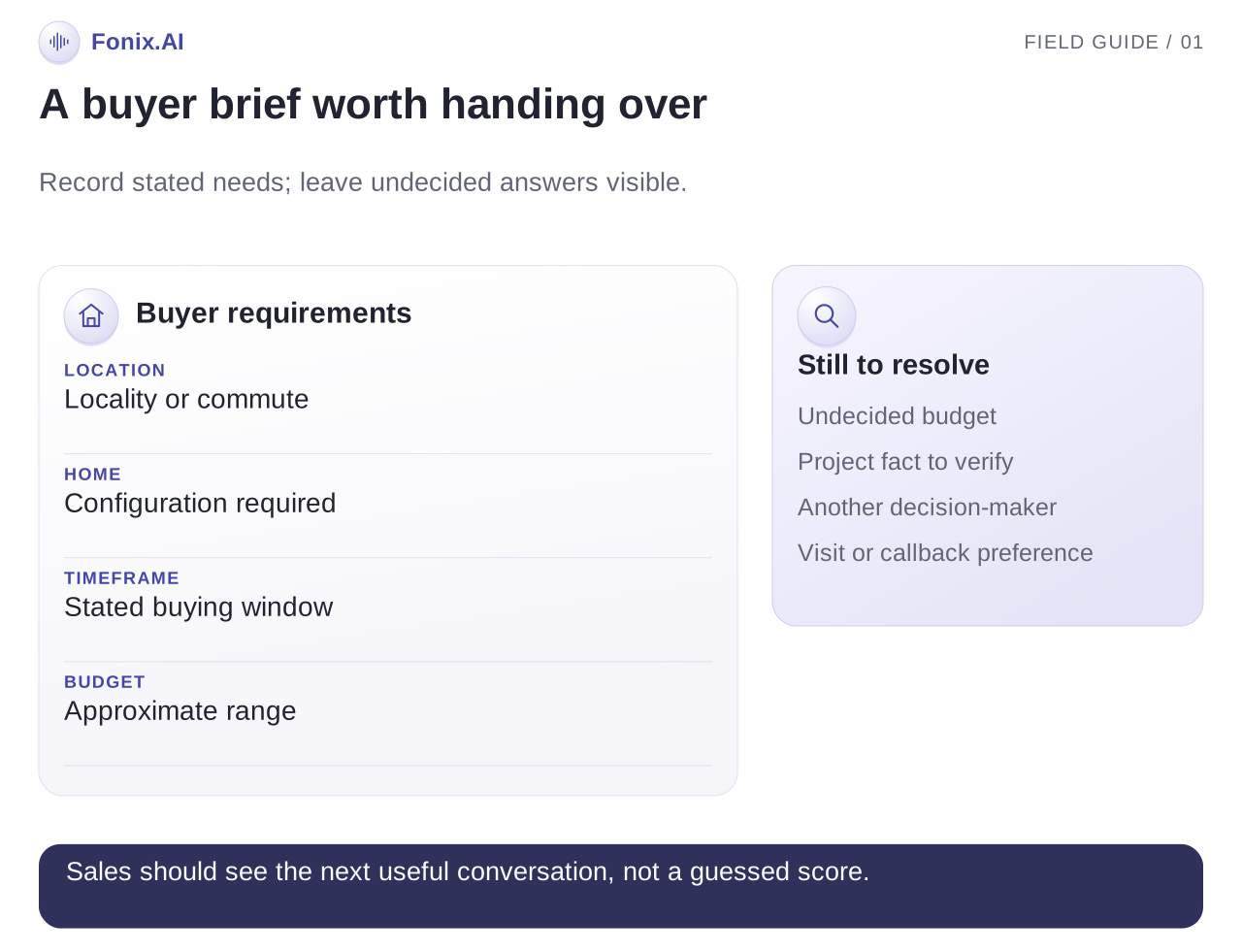
The purpose of the first call is to find the appropriate next conversation. Ask a few questions that determine which inventory or salesperson can help, and let the person answer in their own words.
| Question | What the answer changes | What to record |
|---|---|---|
| Which location or commute matters? | Suitable projects and branches | Required locality and flexible alternatives |
| What home configuration are you considering? | Relevant inventory | Stated configuration, not an inferred family profile |
| When are you hoping to move or buy? | Follow-up timing | Their stated timeframe and any uncertainty |
| Is there an approximate budget range? | Whether a project is worth discussing | Range and currency, with clarification when needed |
| Would a site visit or a salesperson callback help? | Immediate next action | Preferred action and suitable contact time |
Avoid turning missing answers into guessed answers. If a buyer has not decided on a budget, preserve that uncertainty. If the person is still exploring, offer the approved information or a later conversation instead of forcing a visit.
A multilingual qualification test should include place names, amounts and corrections. Understanding “around eighty lakh, not one crore” correctly matters more than sounding fluent while saving the wrong number. The language evaluation guide explains how to score those fields.
Book a site visit against real availability
Use an approved project-information source for current inventory, indicative pricing, location, visit hours and contact instructions. Give each document an owner and update date. The assistant should distinguish an approved quoted fact from a question that needs the sales team.
Do not let it infer possession dates, discounts, financing approval, legal status or investment returns from an old brochure. Route these questions to the responsible person when the answer is not explicitly approved. Even a correct brochure statement may be outdated for a particular unit.
When a buyer requests a visit, retrieve available visit times. Repeat the project, branch or meeting point, date and time. Write the booking only after the buyer agrees, then announce it after the scheduling system confirms the write. If only callback assignment is configured, describe it as a callback request.
Include a reference and sales owner in the resulting record. If directions or a confirmation message are part of the deployment, test that delivery separately. A message being attempted does not prove the buyer has received the address.
A worked call and its resulting record
This is an illustrative conversation for a fictional project. Assume its approved visit calendar has returned an available Sunday slot.
Assistant: Hello, this is the automated assistant for Cedar Homes. You asked about our Whitefield project. Is now a good time to discuss the enquiry?
Buyer: Haan, but two BHK chahiye. Saturday nahi, Sunday afternoon dekh sakte hain.
Assistant: Understood: a two-bedroom home, and Sunday afternoon for a visit. I will check the visit schedule. Are you looking only in Whitefield, or are nearby locations also suitable?
Buyer: Whitefield only. Office wahin hai.
The useful record captures Whitefield as a location requirement, two bedrooms as the requested configuration and Sunday afternoon as a preference. It does not mark a visit confirmed until an exact time has been selected and successfully saved.
An illustrative outcome record could contain enquiry_ref, project_ref, requested_configuration, location_requirement, visit_preference, confirmed_visit_ref, open_questions and sales_owner. These are suggested fields for your workflow, not a published Fonix API schema. Store unknown values explicitly and preserve any correction made during the call.
Handle the cases that break the normal path
| Situation | Decision | Handoff context |
|---|---|---|
| The lead already has a sales owner | Follow the current ownership rule | Existing owner and last contact |
| The requested unit is unavailable | Explain the approved availability; ask about alternatives | Original requirement and alternatives accepted |
| The brochure and CRM disagree | Stop quoting the conflicting fact | Both source references and the disputed field |
| Calendar booking times out | Check the write result before retrying | Attempt reference and requested time |
| Buyer asks about legal approval or returns | Send the question to an authorised salesperson | Exact question and project reference |
| Person requests no further calls | Stop this flow and apply the agreed suppression process | Preference update and affected contact record |
| Buyer asks for a different day | Retrieve availability again | Original visit and replacement result |
Demonstrate a duplicate enquiry and a failed booking during evaluation. Both can sound normal to the buyer while leaving incorrect pipeline records behind. Your team should be able to find and repair the exception without replaying every call.
Measure visits and pipeline quality
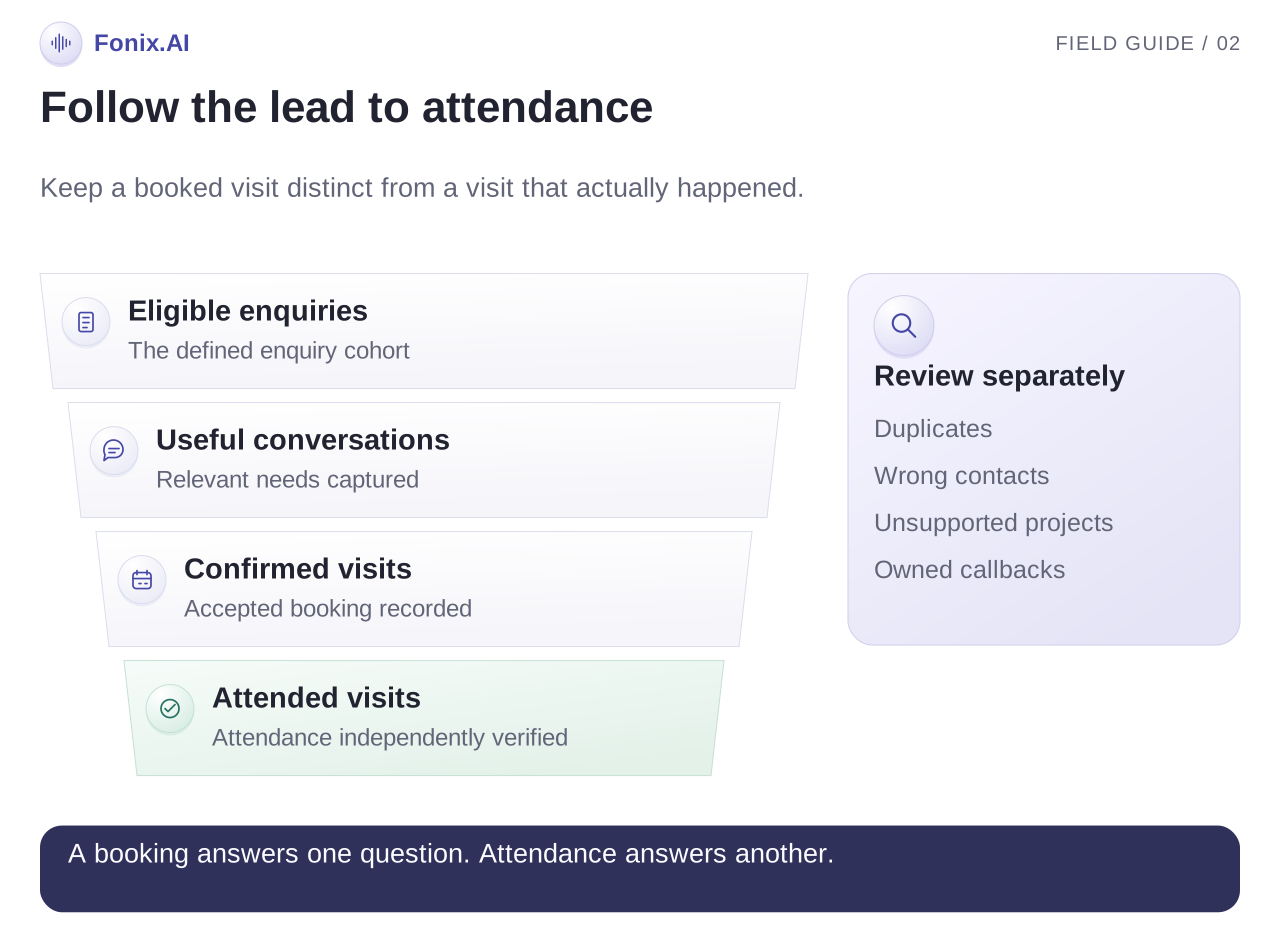
Track enquiry response time, useful conversations, visits requested, visits confirmed, visits attended and callbacks completed. Define “qualified” using agreed buyer requirements and available projects. Avoid treating every connected call as a qualified lead.
Calculate attended visits divided by confirmed visits for the same cohort. Also review attended visits divided by eligible enquiries; the second measure catches a workflow that books few visits but has a high attendance rate. Separate wrong contacts, duplicates and requests for unsupported projects.
Review a sample of records for wrong location, configuration, amount or ownership. Compare similar enquiry sources and project periods when evaluating a pilot. A different campaign mix or a new price can change conversion independently of calling automation.
Bring one project to the demo
Bring a sample enquiry, current project facts, visit-calendar rules, representative buyer phrases and your handoff process. Ask for a normal booking, an unavailable unit, a duplicated lead and a buyer correcting the visit date. Review the written records as well as the audio.
The Fonix real estate use-case page describes the industry context. This implementation guide focuses on how to evaluate the enquiry-to-visit workflow. The calling software guide covers broader integration and purchasing questions.
Request a property-enquiry demo with your project and languages. Confirm the integrations, routing and operating responsibilities before extending the pilot across projects.