

A practical guide / Fonix.AI
Salesforce integration: design and pilot guide
A worked scenario, illustrated decision review and a practical pilot worksheet.
Salesforce voice integration needs explicit object and field permissions
A Salesforce AI voice agent integration should perform a small set of authorised actions against the right Lead, Contact, Account, Opportunity or Case. A broad integration login can make a demo easy while concealing record-visibility and field-update problems that appear in production.
This Fonix.AI design is a scoping guide, not a claim that every Salesforce organisation has the same connector or schema. Start with one business action and validate it under the actual integration user's permissions.
Establish the object path before composing a request
For a support call, resolve the caller and relevant Case under the organisation's approved identity rules. For a sales call, determine whether the record is a Lead or an existing Contact and which opportunity, if any, is relevant. Respect record sharing and field-level permissions; do not expose inaccessible data through the conversational summary.
Salesforce's Composite API reference describes grouped REST operations. Grouping requests does not remove the need to inspect each result or choose an appropriate transaction policy.
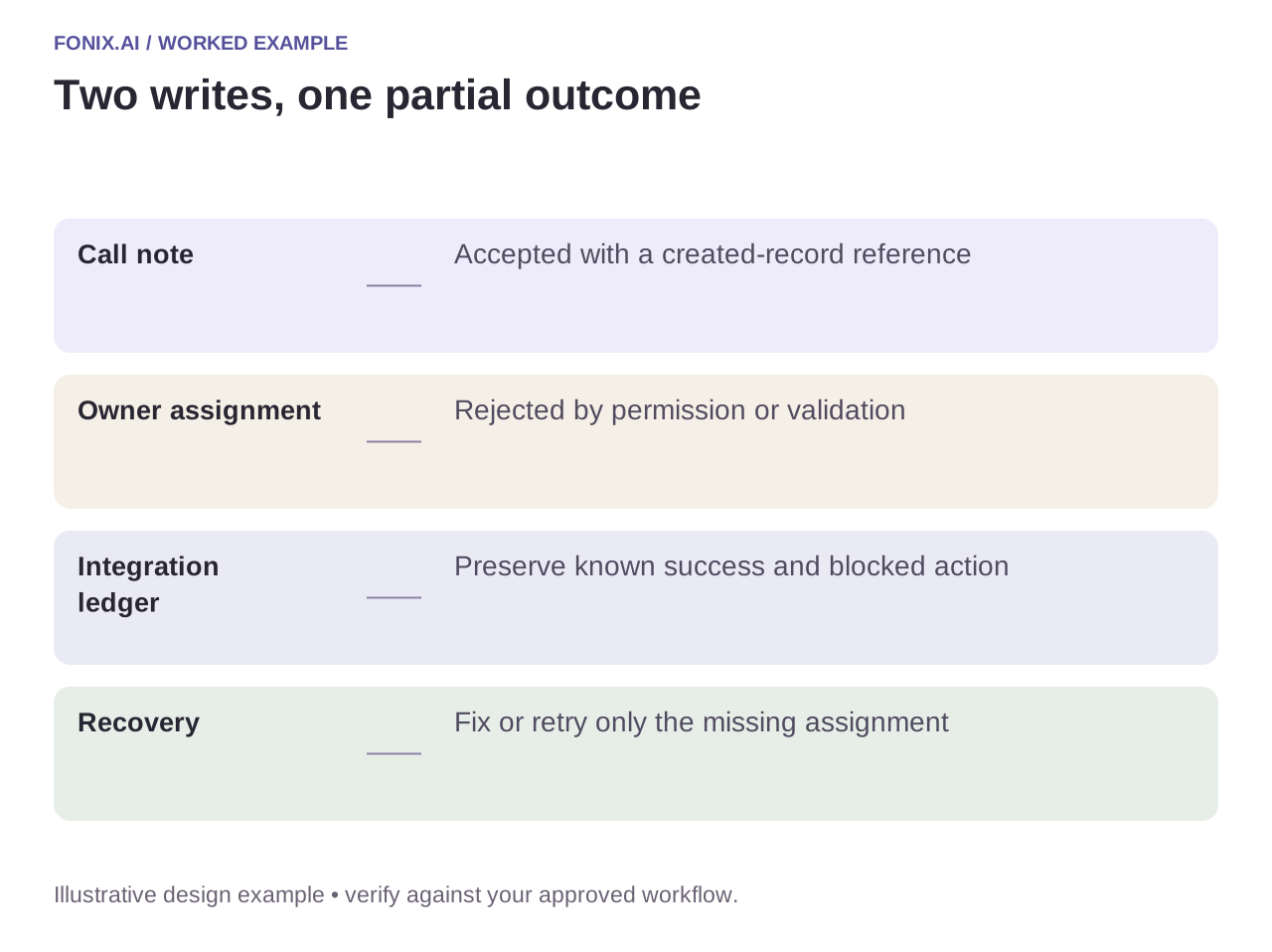
Worked example: the case comment succeeds but assignment fails
A fictional workflow adds an approved call note and assigns a follow-up owner. The note is accepted, but the assignment is rejected by permissions or a validation rule. Record a partial outcome and route the remaining action; do not replay the complete operation and duplicate the note.
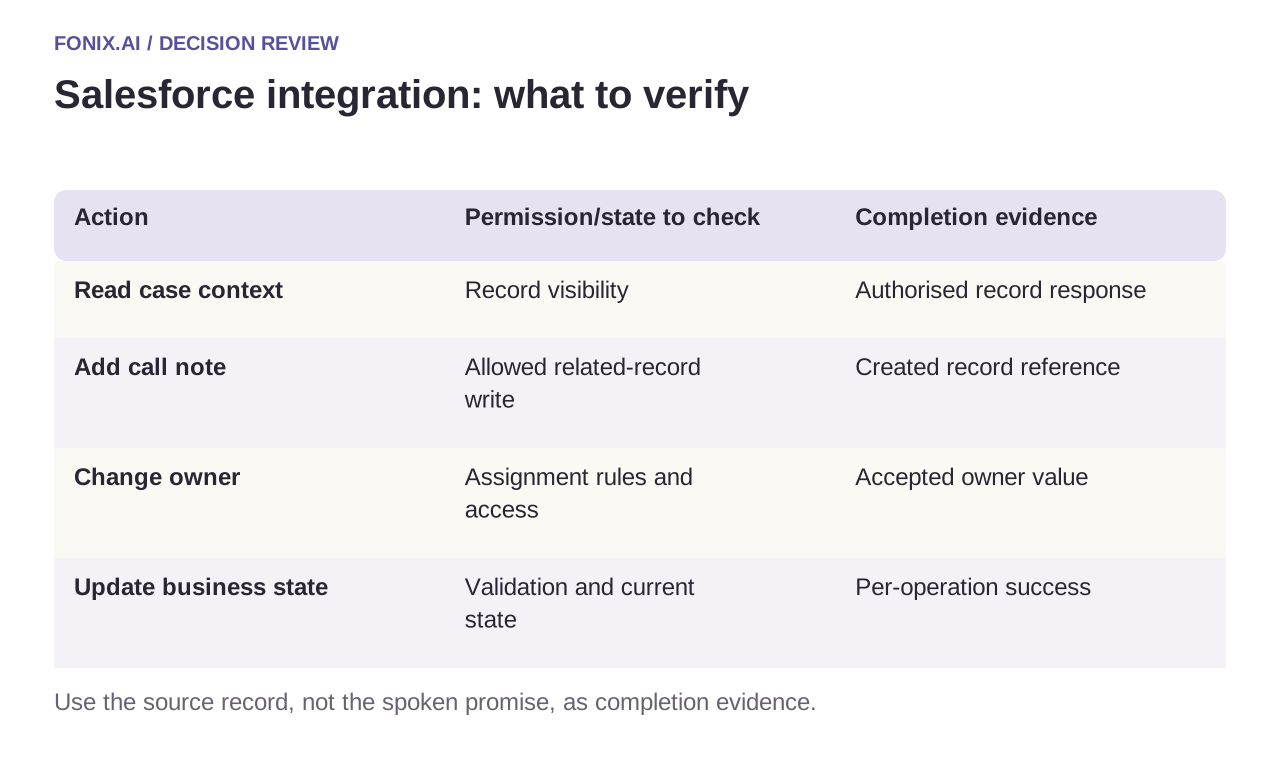
| Action | Permission/state to check | Completion evidence |
|---|---|---|
| Read case context | Record visibility | Authorised record response |
| Add call note | Allowed related-record write | Created record reference |
| Change owner | Assignment rules and access | Accepted owner value |
| Update business state | Validation and current state | Per-operation success |
Preserve human edits and business validation
Capture the relevant state before the conversation and recheck before a consequential update. If a human resolves the case meanwhile, apply the approved conflict rule. A late AI summary should not reopen it merely because the intake originally saw an open status.
Treat validation-rule failures as business feedback, not transient network errors. Permission errors need an owner to correct access; unknown transport results need reconciliation; temporary service failures may justify bounded retry. Keep those paths distinct in the integration ledger.
A Salesforce permission and partial-result test
Use a Salesforce sandbox under the intended restricted integration user. List objects, field permissions, validation rules and assignment behaviour. Define whether each composed operation must be atomic or may leave explicitly recoverable partial results.
| Pilot case | Required behaviour |
|---|---|
| A case comment succeeds but assignment fails | Retain the comment reference and retry only the permitted missing action after reconciliation. |
| A field is unreadable to the integration user | Return the approved restricted response; do not use a broader user as an invisible fallback. |
| A human edits the record before the summary arrives | Re-read relevant state and preserve the approved conflict rule. |
Report intended business actions by accepted, rejected, unknown and reconciled states. Count correctly owned cases and protected fields disclosed without authority. A single aggregate request-success rate hides partial results and permission failures.
Does Composite API automatically make every workflow atomic?
Do not assume that. Select and verify the transaction behaviour supported by the exact API operation and options, then inspect individual responses. Document which completed actions survive a failure and how the integration will reconcile them.
Demonstrate under the intended integration identity
Run tests for a hidden record, a read-only field, a validation failure and a partial multi-action result. Inspect resulting records and automation effects in a sandbox. Report correct authorised outcomes and unresolved exceptions; an administrator-only demo does not establish ordinary operating access.
Bring your object map and approved permission set to review Salesforce voice integration. Customer verification defines caller authority; function reliability defines action reconciliation. Official reference checked 15 October 2026; pin the API version for implementation.