

A practical guide / Fonix.AI
Zapier automation: design and pilot guide
A worked scenario, illustrated decision review and a practical pilot worksheet.
Zapier AI calling automation should preserve event identity
Zapier AI calling automation can connect a business event or call outcome to a follow-up action. A trustworthy design separates receiving the event, checking eligibility, requesting the action and verifying its result. A successful Zap run is not automatically a completed call or accepted sales task.
This Fonix.AI guide scopes webhook-based automation and its acceptance tests. A dedicated Fonix Zapier app or supported call endpoint must be confirmed; the design does not claim that a native app is already installed in the directory.
Choose the trigger and its operating contract
Zapier's webhook-trigger guide describes Catch Hook and Catch Raw Hook. Match the trigger to the payload and authentication design. Treat generated hook URLs as operational connection details, not something to publish in tutorials or screenshots.
Define a durable source-event key, business record reference and action key. Do not rely on a contact phone number alone: one person can submit separate enquiries. If events can arrive concurrently, enforce uniqueness in a store that provides the required atomic behaviour.
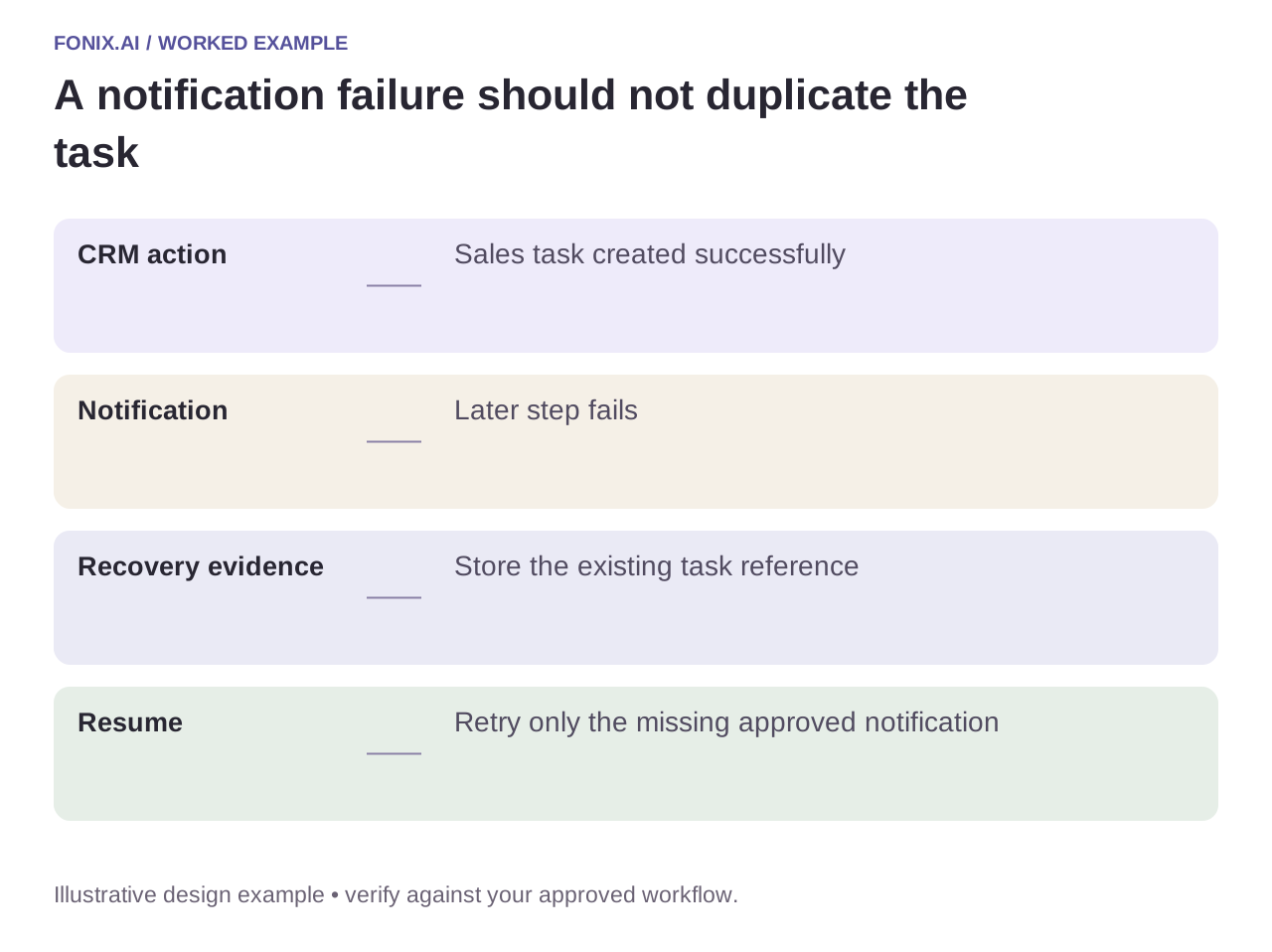
Worked example: a CRM task exists but the final step fails
A fictional post-call Zap creates a sales task and then fails while sending a team notification. Replaying the whole Zap can create a second task. Store the completed action reference and resume only the unfinished notification after checking its state.
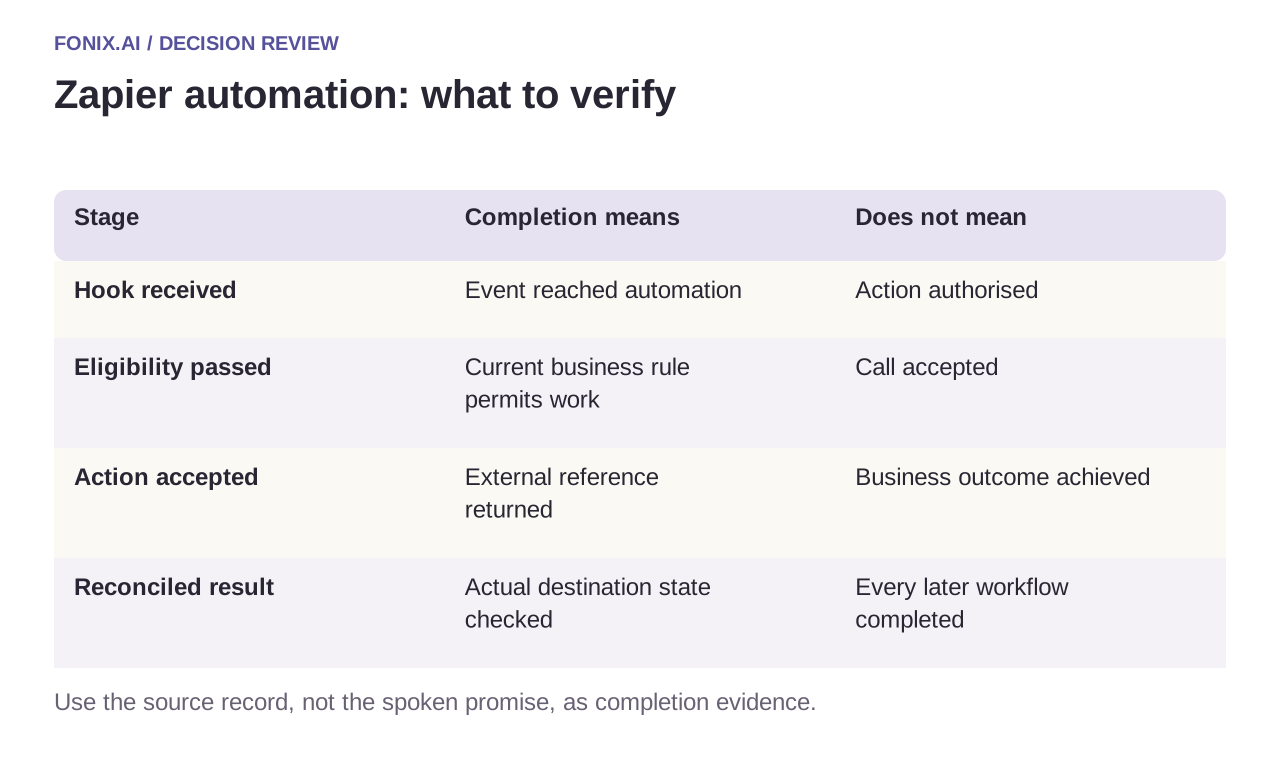
| Stage | Completion means | Does not mean |
|---|---|---|
| Hook received | Event reached automation | Action authorised |
| Eligibility passed | Current business rule permits work | Call accepted |
| Action accepted | External reference returned | Business outcome achieved |
| Reconciled result | Actual destination state checked | Every later workflow completed |
Keep delayed work current
Before a delayed call or follow-up, re-read contact preferences, current owner and whether the enquiry remains open. A cancelled request should not be revived merely because a Zap delay has ended. Keep polling-trigger behaviour distinct from immediate webhook delivery when setting expectations.
Separate credential, validation and temporary-service failures. A rejected business field needs correction; repeating it faster will not help. A lost acceptance response needs reconciliation, while a known temporary error can use bounded retry under policy.
A Zapier delayed-work and partial-replay drill
Choose one Zapier trigger and document its delivery or polling behaviour. Use synthetic events, a durable action map and a test destination. Agree how delayed work rechecks current eligibility before requesting a call.
| Pilot case | Required behaviour |
|---|---|
| A sales task exists but the notification failed | Reuse the task reference and recover only the missing notification. |
| A delayed enquiry is cancelled before execution | Refresh the record and suppress the obsolete action. |
| A connection loses permission | Expose the blocked action to its owner rather than retrying a permanent access failure indefinitely. |
Track intended destination actions, duplicates and unresolved failures by business task. Review the actual CRM records alongside Zap history. A received hook establishes arrival, not permission to dial or completion of the requested outcome.
Does receiving a webhook mean the call started immediately?
No. Eligibility checks, workflow scheduling and provider acceptance are separate stages. State expectations using the actual trigger and action behaviour, and confirm a call only when its accepted reference is known.
Test the run history and the destination record
Use a repeated event, an expired connection, a cancelled enquiry and a failure after task creation. Inspect the actual CRM/task record as well as Zap history. Measure duplicate actions, unresolved failures and accepted handoffs.
Review Zapier voice automation with your trigger and intended action. HubSpot integration covers CRM association; function reliability covers partial results. Official trigger reference checked 15 October 2026.