

A practical guide / Fonix.AI
Zoho CRM integration: design and pilot guide
A worked scenario, illustrated decision review and a practical pilot worksheet.
Zoho CRM AI calling must survive lead conversion
Zoho CRM AI calling should preserve the relationship between a conversation and the correct current CRM record. A lead can become a contact and an account while a call is underway. Writing only to the original lead reference risks losing the result or duplicating the person.
Use this Fonix.AI integration design to agree module mappings, permissions and conversion handling before a pilot. It describes the required behaviour; a native connector and its supported actions must be demonstrated for your deployment.
Map module metadata before writing fields
Document which Zoho modules hold people, enquiries, activities and owners. Read the account's actual field metadata and internal names, including custom picklists and required fields. Labels visible in the UI are not a reliable payload schema.
Zoho's V8 lead-conversion reference describes conversion into related records. Preserve that relationship in the integration's identity map. Do not let a phone match recreate a lead after the person has already been converted.
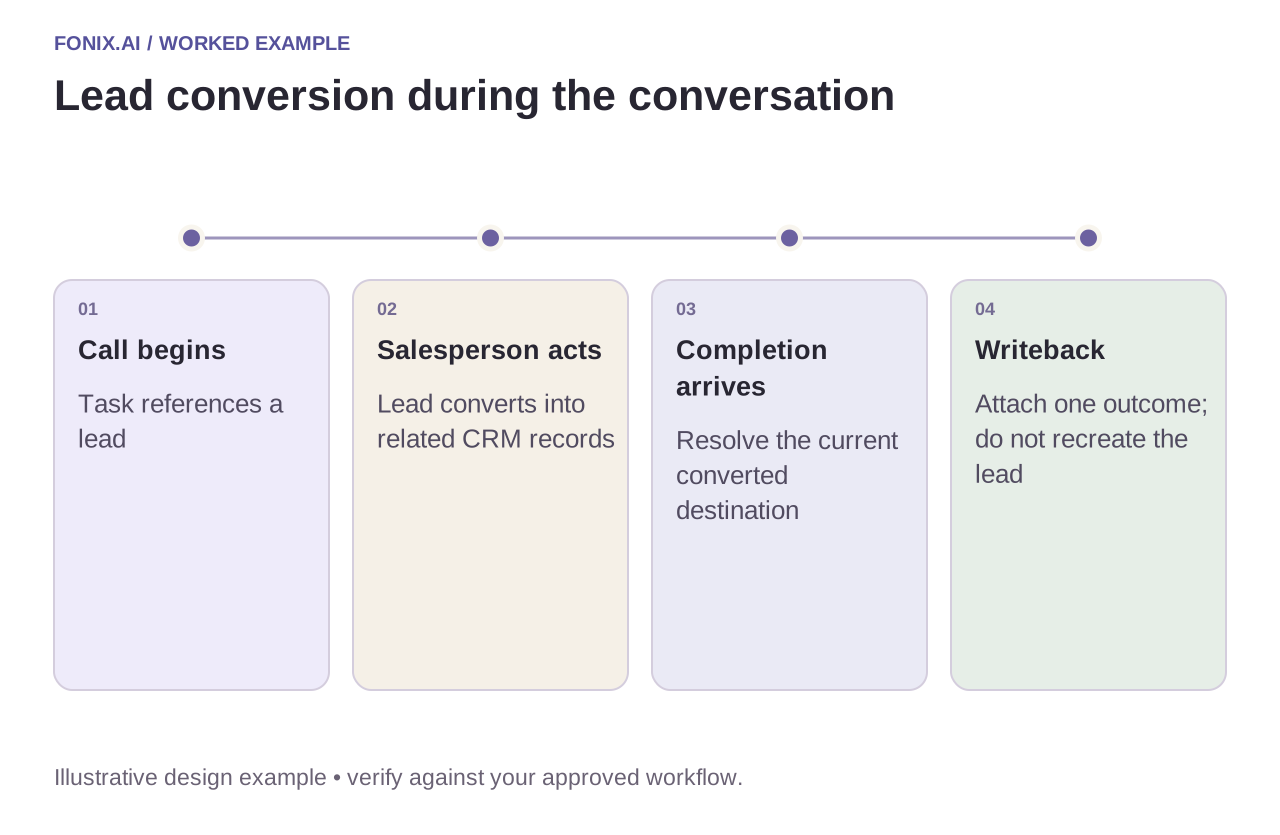
Worked example: conversion happens during a qualification call
A fictional salesperson converts a lead while the voice agent collects requirements. At completion, the integration checks the current record state, resolves the converted destination and attaches the outcome under the agreed mapping. It should not blindly retry a failed write against the old lead or create a replacement lead.
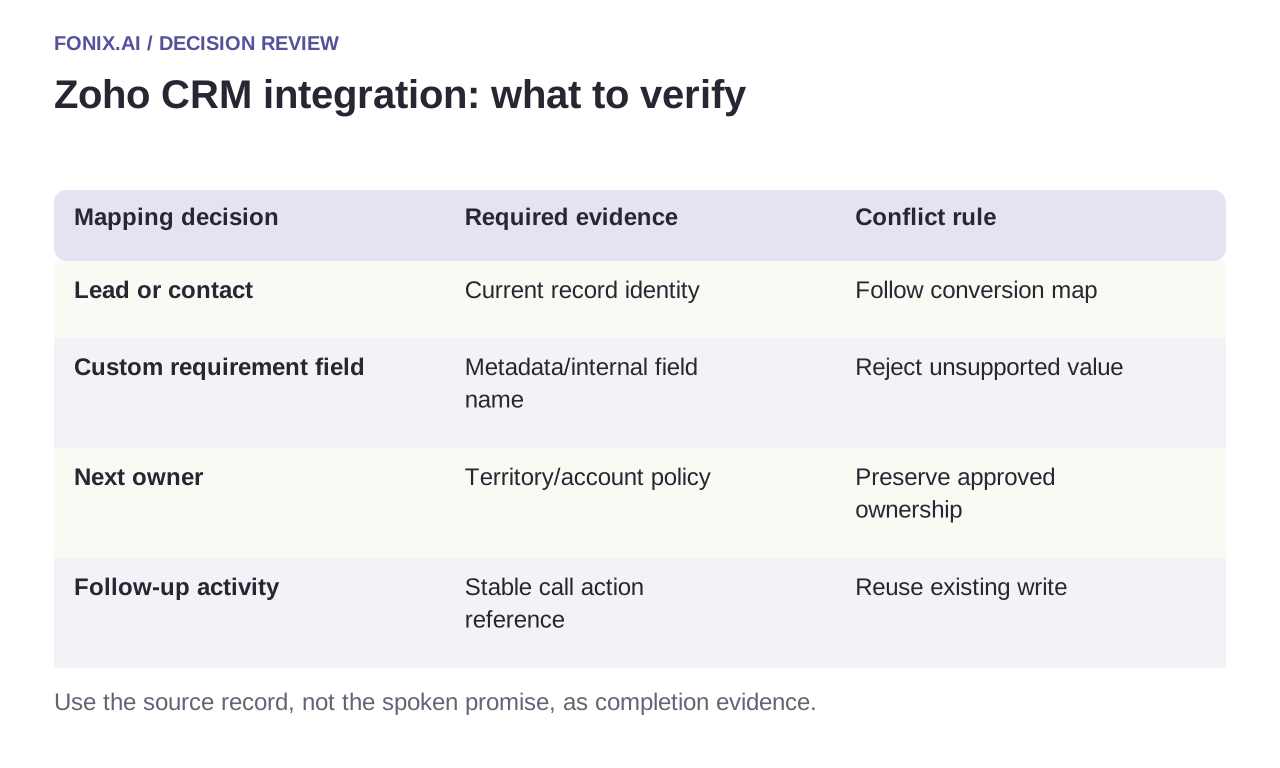
| Mapping decision | Required evidence | Conflict rule |
|---|---|---|
| Lead or contact | Current record identity | Follow conversion map |
| Custom requirement field | Metadata/internal field name | Reject unsupported value |
| Next owner | Territory/account policy | Preserve approved ownership |
| Follow-up activity | Stable call action reference | Reuse existing write |
Keep automation triggers intentional
Agree which writes may trigger CRM workflows. A harmless summary update can otherwise launch another outreach sequence or reassign an owner. Record the intended trigger behaviour with the field mapping and test it in a sandbox.
Use a server-side integration identity with the necessary module access. Refresh or revoke credentials through the app's approved process, not a conversational instruction. Rate limits and expired access should move the task into a recoverable state; they should not make the caller hear a false “updated successfully”.
A Zoho conversion and custom-field rehearsal
Prepare a Zoho sandbox with custom fields and a lead that can be converted during a test call. Document module access, internal field names and expected automation triggers for the chosen API version.
| Pilot case | Required behaviour |
|---|---|
| Sales converts the lead while the call runs | Resolve the destination contact/account mapping before writing the outcome. |
| A required custom picklist rejects the value | Keep the rejected action visible and request mapping correction instead of discarding the result. |
| An outcome update qualifies for another calling workflow | Use explicit event ownership and eligibility guards to prevent self-triggered outreach. |
Score correctly attached outcomes after conversion and duplicate-person records created per eligible task. Track rejected fields and manual reconciliation. Preserving a green workflow run while losing the activity on the old lead is not success.
Can we copy field labels directly from the CRM screen?
Use the actual module metadata and internal API names. Display labels and account customisations can differ from the payload contract. Test required values and triggered automation under the intended integration identity before enabling writes.
Test conversion and custom-field failures
Include conversion mid-call, a required custom field, an invalid picklist value and a duplicated completion event. Verify the destination module, related record and downstream workflow effects. Measure correct outcomes per eligible call and the reconciliation backlog, rather than counting API requests as business updates.
Review a Zoho CRM calling workflow with sanitised module metadata and a conversion example. Use lead reactivation for older-record eligibility and access controls for write permissions. Reference checked 15 October 2026; confirm the API version and data centre for the actual account.