
A practical guide / Fonix.AI
Lead reactivation: a practical implementation guide
A worked scenario, illustrated decision review and a practical pilot worksheet.
Lead reactivation starts with eligibility, not a phone list
Automated lead reactivation calls revisit older enquiries whose circumstances may have changed. A useful workflow identifies why the record became inactive, whether contact remains appropriate and who owns any renewed interest. Calling every old CRM number creates noise and can conflict with current sales conversations.
Use Fonix.AI to evaluate a defined dormant cohort and a specific reason for contact. The lead qualification guide handles new enquiries; this page concerns historical records, suppression and renewed intent.
Reconstruct the last meaningful interaction
Retrieve enquiry source, original interest, last contact, inactivity reason, current owner and contact preferences. Keep “not reached”, “timing unsuitable”, “not a fit” and “do not contact” distinct. A date-based filter cannot replace those decisions.
Resolve merged records and existing opportunities before calling. A lead inactive in one campaign may be an active customer in another. Ask the account owner how to treat such records and enforce the rule at execution time, after any queue delay.
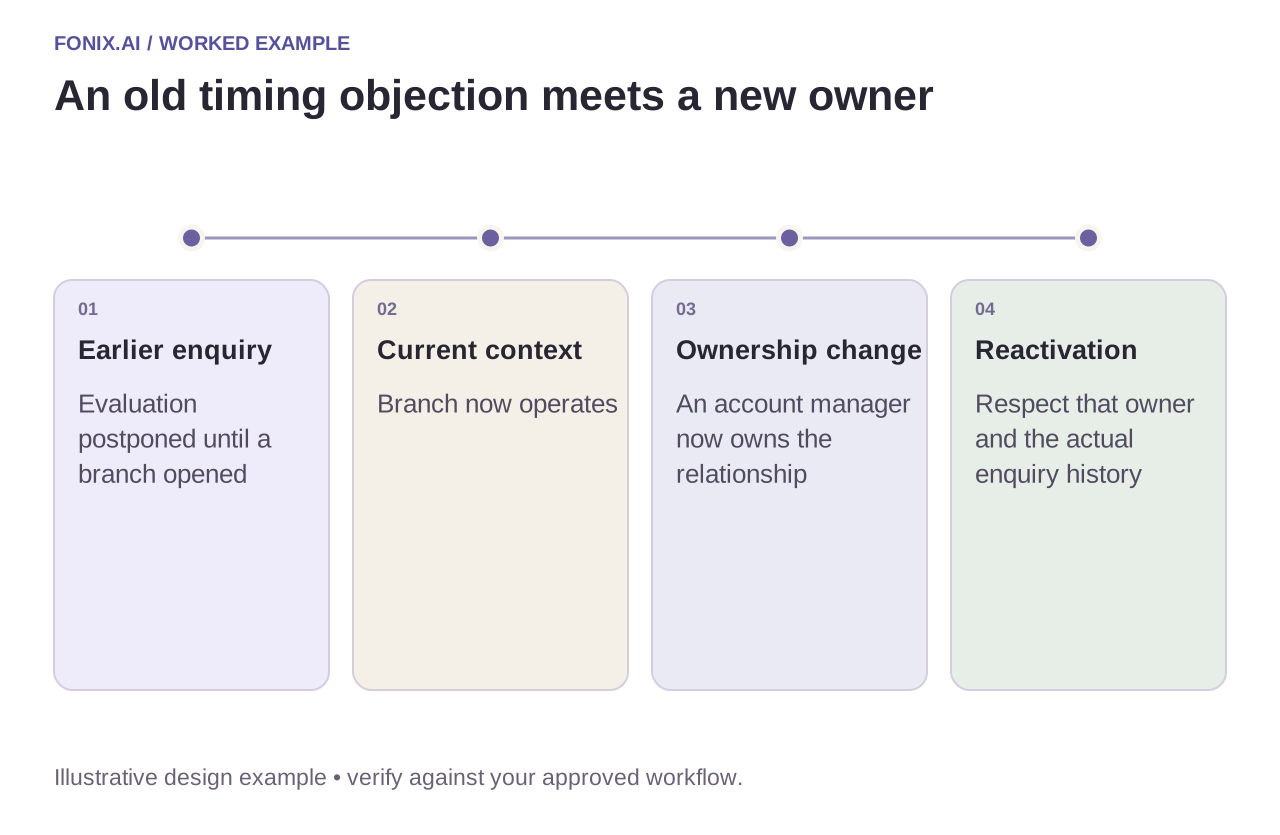
Worked example: timing changed, ownership did too
A fictional prospect postponed evaluation until a new branch opened. The branch is now operating, but the organisation has also assigned an account manager. The call should respect that owner and refer accurately to the old enquiry. It should not pretend the person submitted a fresh demo request.
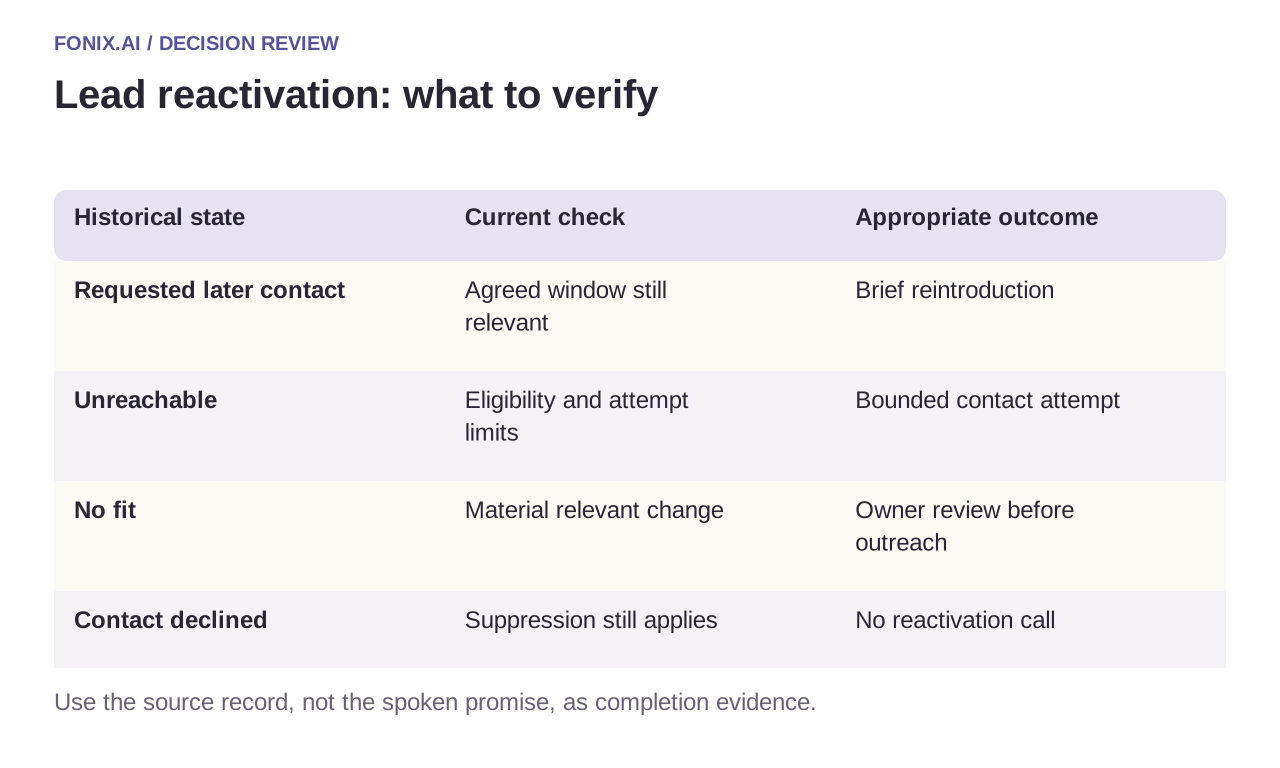
| Historical state | Current check | Appropriate outcome |
|---|---|---|
| Requested later contact | Agreed window still relevant | Brief reintroduction |
| Unreachable | Eligibility and attempt limits | Bounded contact attempt |
| No fit | Material relevant change | Owner review before outreach |
| Contact declined | Suppression still applies | No reactivation call |
Record renewed interest without rewriting history
If the buyer's needs changed, add a dated statement and link it to the original enquiry. Preserve the earlier decision and its reason. A new “interested” label should not erase a previous objection or invent a confirmed budget.
Keep refreshed requirements, requested next step and receiving sales owner explicit. If the person no longer recognises the enquiry, allow a short explanation and an easy end to the call. A wrong-number response should stop that record's automated continuation through the approved process.
A sales-owned reactivation cohort worksheet
Choose one dormant enquiry cohort and document why each record is eligible. Include merged records, prior contact preferences and active opportunities. Sales should agree the reintroduction, attempt limits and ownership rules before any outreach.
| Pilot case | Required behaviour |
|---|---|
| An old enquiry is now part of a live opportunity | Apply the current owner's policy instead of starting an unrelated sequence. |
| The person previously declined further contact | Suppress the call under the approved preference rule. |
| A buyer requests a later evaluation window | Record the exact requested timing and next owner without inventing qualification details. |
Where practical, compare accepted opportunities and attended next steps with a similar eligible holdout. Also report wrong-number handling, suppression failures and duplicate contacts. Connected calls are activity; they are not automatically incremental pipeline.
Can we reactivate every lead older than a set date?
Age can help select candidates but cannot establish permission or relevance. Recheck contact preference, inactivity reason, record merges and current sales activity at execution time. A deliberately smaller, appropriate cohort is easier for the receiving sales team to serve.
Measure incremental opportunities with a holdout
Where practical, compare an eligible called cohort with a similar holdout over the same period. Count accepted opportunities and attended next steps, not every connected conversation. Include suppression accuracy, duplicate contact and sales complaints as quality measures.
Test an account already in a live deal, an old opt-out, a merged record and a buyer who changes the requested timing. Review a dormant-lead workflow with your CRM history and ownership rules. HubSpot mapping and Zoho mapping show why platform identity matters.
Teams using other CRMs can apply the Freshsales ownership worksheet or LeadSquared trigger review. Both focus on a recoverable sales handoff rather than treating a call label as a pipeline decision.