

A practical guide / Fonix.AI
Call overflow: a practical implementation guide
A worked scenario, illustrated decision review and a practical pilot worksheet.
Overflow automation needs an admission decision
Call overflow automation handles arrivals that exceed the normal queue's capacity. A useful design decides whether to admit a call to an AI conversation, keep it in a human queue or offer an owned callback. Sending every overflow call to another overloaded service simply moves the waiting room.
Evaluate Fonix.AI using your carrier, PBX and receiving-team limits together. Concurrency is not an isolated model number: phone routes, voice workers, tool APIs and human transfers can each become the bottleneck.
Define the thresholds before the busy period
Record the main queue's waiting-time rule, maximum waiting callers, AI admission limit and callback capacity. Give each threshold an owner and a fallback. Use current availability when choosing a route; yesterday's average queue length cannot tell you whether a person can answer now.
Separate inbound arrivals from active conversations and transfer legs. A warm transfer may temporarily use additional call resources. Reserve capacity for existing conversations so a burst of new calls does not degrade every caller already being served.
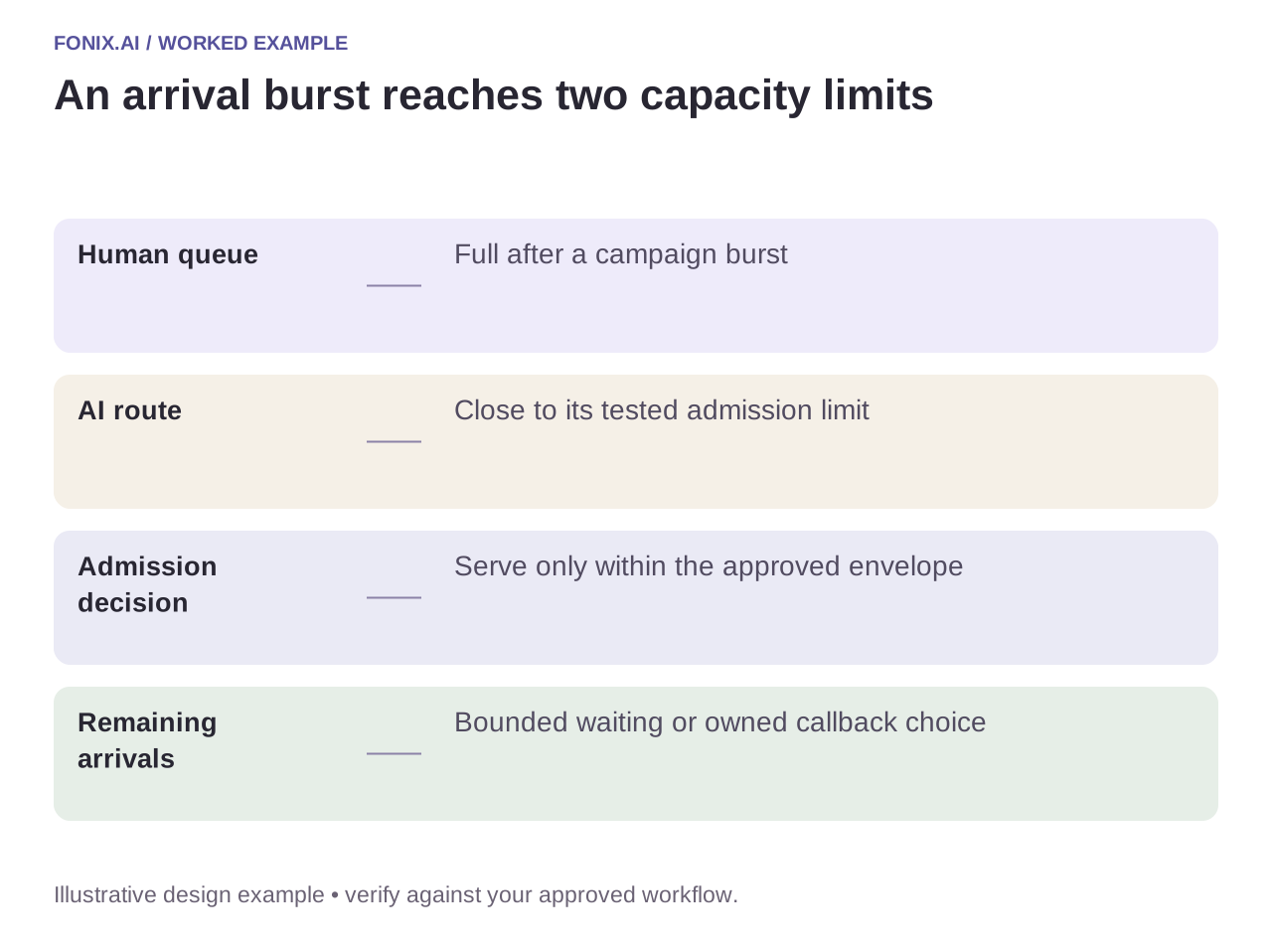
Worked example: a campaign creates a sudden arrival burst
A fictional support team receives a burst after an email campaign. The human queue is full, and the AI route is close to its approved limit. Admit only calls the tested path can serve. Other callers receive the approved waiting or callback choice, with a clear expectation about the next step.
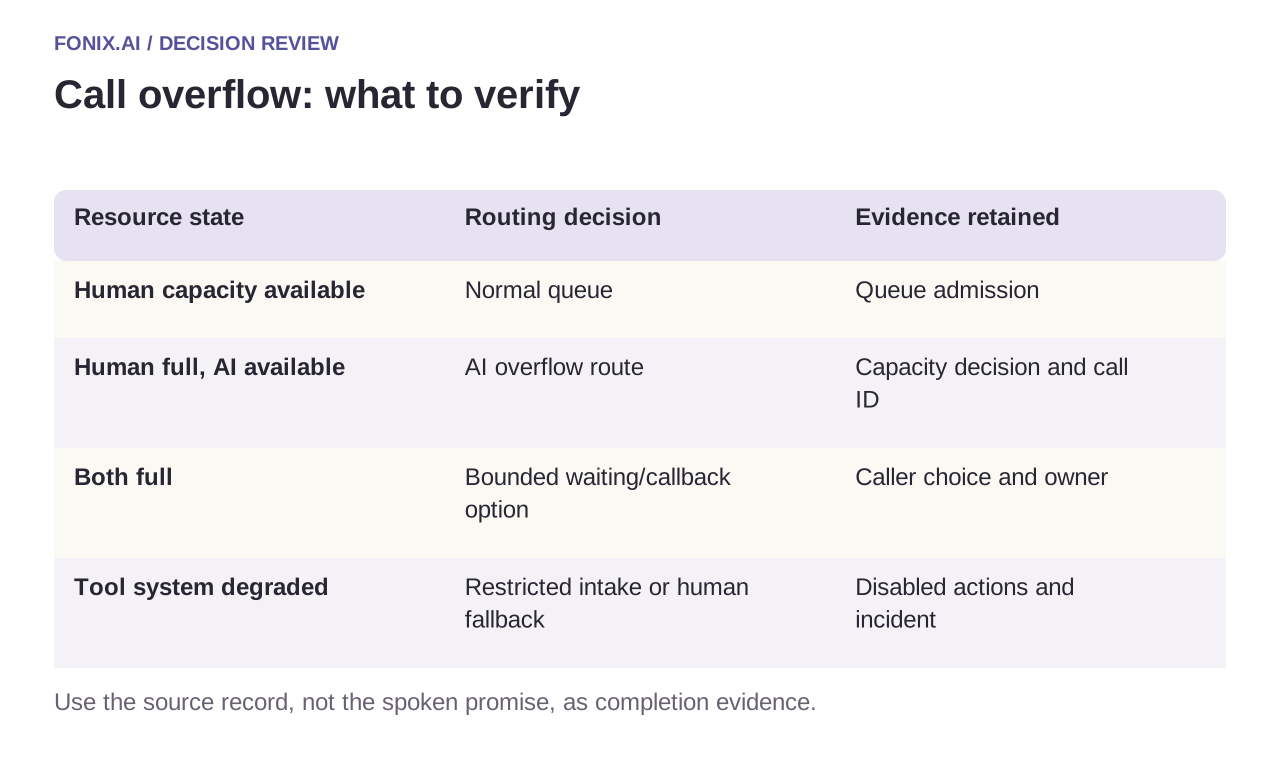
| Resource state | Routing decision | Evidence retained |
|---|---|---|
| Human capacity available | Normal queue | Queue admission |
| Human full, AI available | AI overflow route | Capacity decision and call ID |
| Both full | Bounded waiting/callback option | Caller choice and owner |
| Tool system degraded | Restricted intake or human fallback | Disabled actions and incident |
Avoid callback debt and transfer loops
A callback offer is an operational commitment. Cap the backlog against the receiving team's actual capacity and preserve caller preferences. Do not repeatedly call a person whose original enquiry was already resolved in another channel.
Tag the route history so the PBX and agent do not bounce the same call back to each other. If a required business API is unavailable, restrict the offered outcome to what remains possible. “We can record your request” is accurate; “your change is complete” is not.
A peak-arrival worksheet for queue owners
Collect a workload profile with arrival bursts, call duration and transfer frequency. Agree queue thresholds with the PBX owner and callback limits with the receiving team. Reserve a test window so load experiments do not disrupt customers.
| Pilot case | Required behaviour |
|---|---|
| Both human and AI capacity are exhausted | Apply a bounded wait or owned callback choice rather than admitting an unusable session. |
| Business APIs slow during an arrival burst | Restrict unsupported outcomes and monitor unresolved requests instead of claiming success. |
| A transfer loops back into the overflow entry | Stop using the approved route-attempt limit and record the fallback reason. |
Report offered, admitted, abandoned and completed calls for the same interval. Add waiting-time percentiles, unresolved callback age and transfer failures. Excluding refused calls would overstate the system's usable capacity.
Is a maximum concurrent-call number enough for sizing?
No. The tested operating point depends on arrival patterns, media resources, tool throughput and human-transfer capacity. Evaluate the whole route under representative conditions and retain headroom for slow dependencies and existing conversations.
Measure the tail, not only the average
Run a burst followed by steady arrivals and a downstream slowdown. Report offered, admitted, abandoned and completed calls over the same interval, plus waiting-time percentiles and unresolved callbacks. Include the calls refused by admission control in capacity reporting.
Review a peak-call routing policy with your queue rules and workload profile. The concurrent-call test guide defines a reproducible load experiment; after-hours routing handles closed teams rather than busy ones.
For a shared contact-centre operation, the BPO voice pilot adds client isolation and exception staffing to queue capacity. Spare call slots do not imply that a specialist team can accept more unresolved work.