
A practical guide / Fonix.AI
Warranty intake: a practical implementation guide
A worked scenario, illustrated decision review and a practical pilot worksheet.
Warranty support begins with evidence and entitlement
A warranty support voice bot can collect a product reference, reported fault, purchase evidence and service history. It should prepare an owned claim or service request without deciding coverage, accepting liability or promising a replacement outside the business's approved rules.
Evaluate Fonix.AI around one product category and its warranty process. This guide covers post-sale claim intake; a delivered product awaiting first installation belongs in the installation booking guide.
Resolve serial number and purchase source separately
Capture the serial number with a correction/readback procedure and check its authorised product record. Purchase date, seller and proof may live in a different system. Preserve missing or contradictory evidence instead of filling it from a guessed model age.
Ask for the reported issue and previous service reference. Record what the customer observed, not an agent-generated diagnosis. If physical inspection is required, retain that dependency. A product matching the catalogue does not establish that every reported failure is covered.
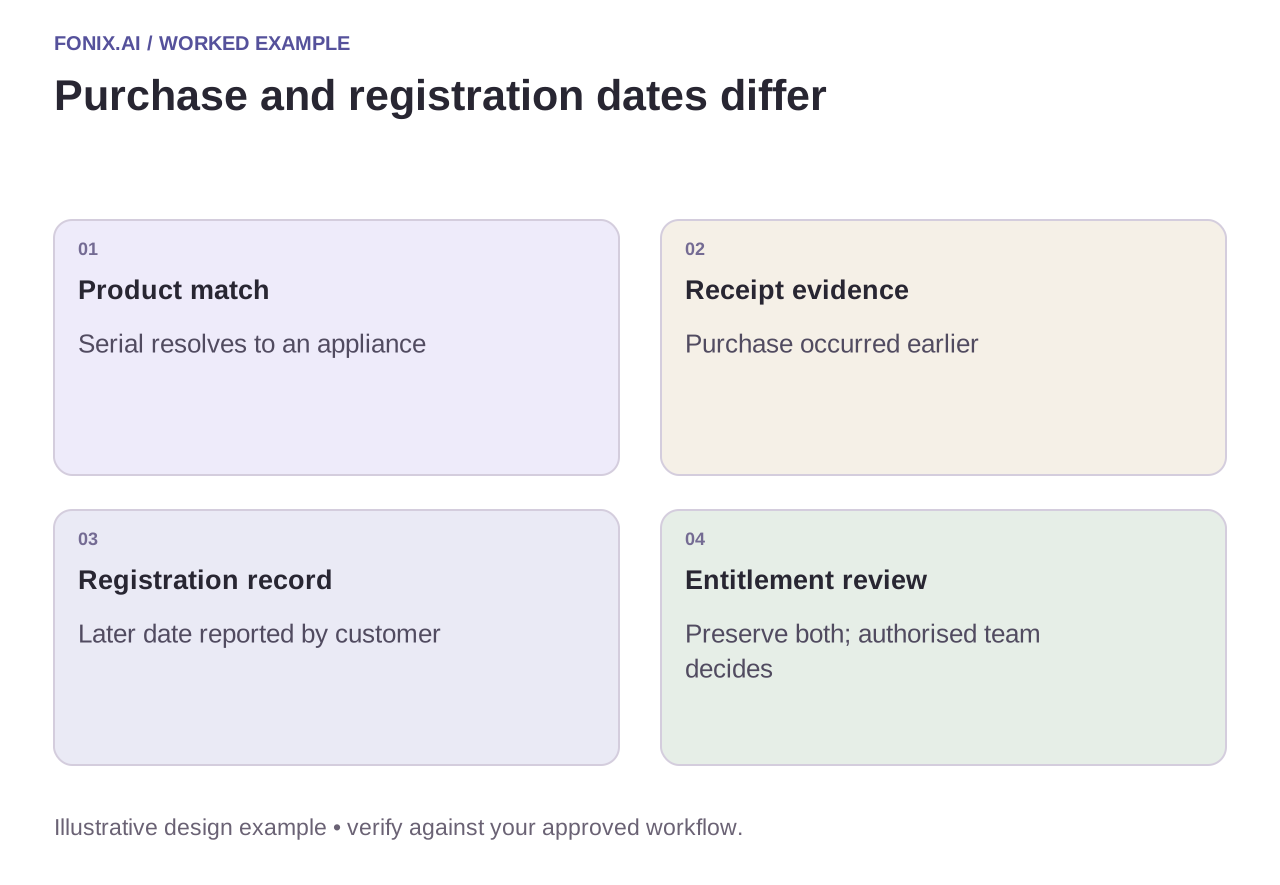
Worked example: the receipt and registration dates differ
A fictional appliance was registered after purchase. The caller gives the registration date as the start of warranty, while the receipt shows an earlier date. The intake should preserve both and request the authorised entitlement decision. It must not silently select the later date to approve the claim.
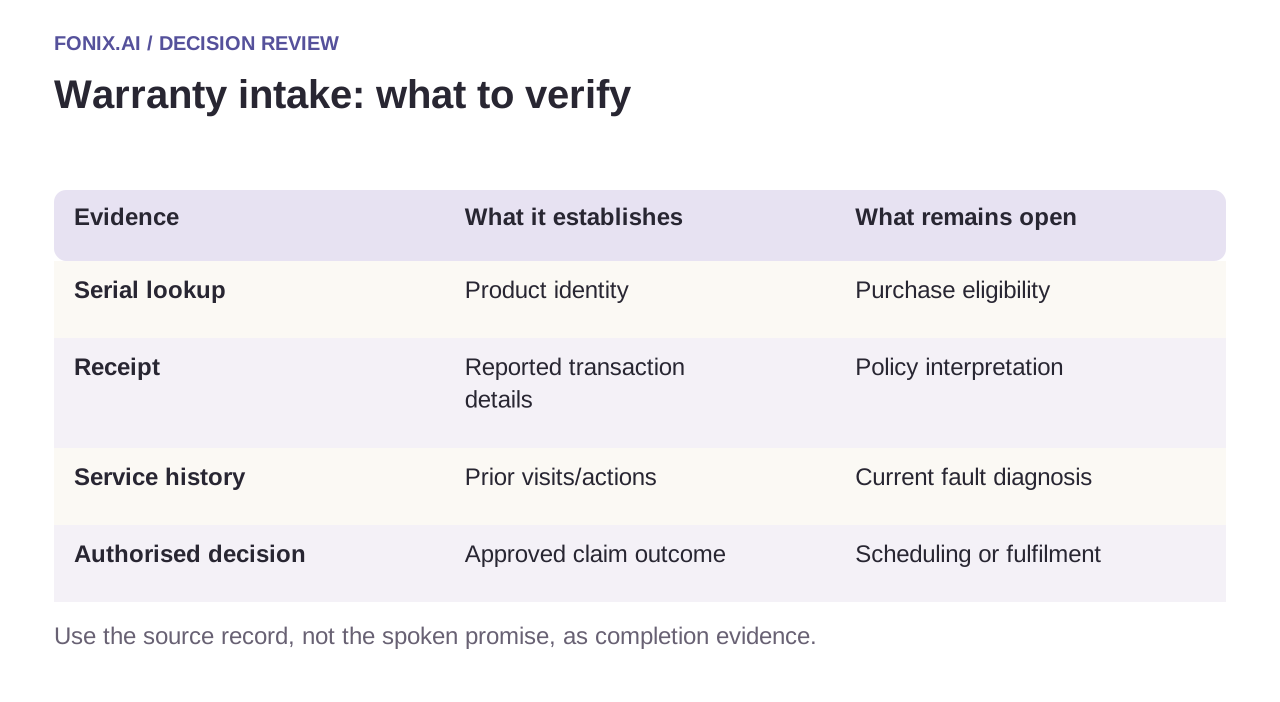
| Evidence | What it establishes | What remains open |
|---|---|---|
| Serial lookup | Product identity | Purchase eligibility |
| Receipt | Reported transaction details | Policy interpretation |
| Service history | Prior visits/actions | Current fault diagnosis |
| Authorised decision | Approved claim outcome | Scheduling or fulfilment |
Keep intake, approval and service booking distinct
Return an intake reference when the record is accepted. Tell the caller which evidence is pending and who reviews it. A ticket creation response does not mean a replacement or repair is authorised.
Before booking a service visit, check the approved action, technician skill and region. Link repeat calls to the same claim. If the customer corrects a serial number, revalidate entitlement rather than retaining approval from the earlier product. Escalate safety reports through the manufacturer's approved route without improvising repair instructions.
A warranty intake worksheet before entitlement review
Choose a product category and synthetic serial, receipt and service-history records. The warranty owner should define evidence requirements, approval authority and the safe route for urgent product reports.
| Pilot case | Required behaviour |
|---|---|
| Receipt and registration dates disagree | Keep both evidence sources and request the authorised entitlement decision. |
| The caller corrects the serial number | Revalidate the product and coverage context; do not carry approval across products. |
| A service visit requires an approved remedy | Keep scheduling pending until the permitted action and suitable resource are established. |
Measure complete, correctly linked intake records and clarification work caused by missing evidence. Track unsupported coverage and replacement promises explicitly. A created case proves intake, not acceptance of liability or completion of a remedy.
Can the agent diagnose the fault to speed approval?
It can capture the customer's observations and approved intake answers. Diagnosis, inspection and entitlement decisions remain with the authorised workflow. Preserve that distinction so a helpful conversation does not become an unsupported warranty commitment.
Evaluate traceability and avoided rework
Test a corrected serial, missing receipt, repeat claim and conflicting purchase dates. Measure complete, accurately linked intake records and review time caused by missing evidence. Track unsupported promises explicitly; a friendly “covered” answer can create a dispute when no authorised decision exists.
Review warranty intake by voice with sanitised claim examples and your approval matrix. Names and numbers testing covers serial accuracy; home-service dispatch covers accepted technician appointments.
If the caller is notifying an insurer rather than seeking a manufacturer's warranty service, use the separate insurance claims intake guide. It preserves reported incident facts without making coverage or liability decisions.