
A practical guide / Fonix.AI
Warm transfers: a practical implementation guide
A worked scenario, illustrated decision review and a practical pilot worksheet.
A warm transfer ends when the receiving person accepts
An AI voice agent warm transfer should connect the caller to an appropriate person with useful context. Dialling an extension or receiving a ringing event does not establish that anyone answered. Treat conversation preparation, transfer attempt, recipient acceptance and final bridge as distinct states.
For Fonix.AI, confirm the supported carrier/PBX transfer path during scoping. Consultative transfer, blind transfer and a callback request have different behaviour; do not describe all three as a completed warm handoff.
Define who hears what before bridging
Choose the destination from approved department, account and availability rules. Prepare a short context brief: caller's request, verification state, actions already attempted and the unresolved question. Keep private fields out of a briefing unless the recipient is authorised to receive them.
Decide whether the caller waits on hold, hears a progress message or joins a consultation. Specify maximum wait and the action for busy, rejected, no-answer and disconnected destinations. A person requesting a human should not have to repeat the same request through an endless agent loop.
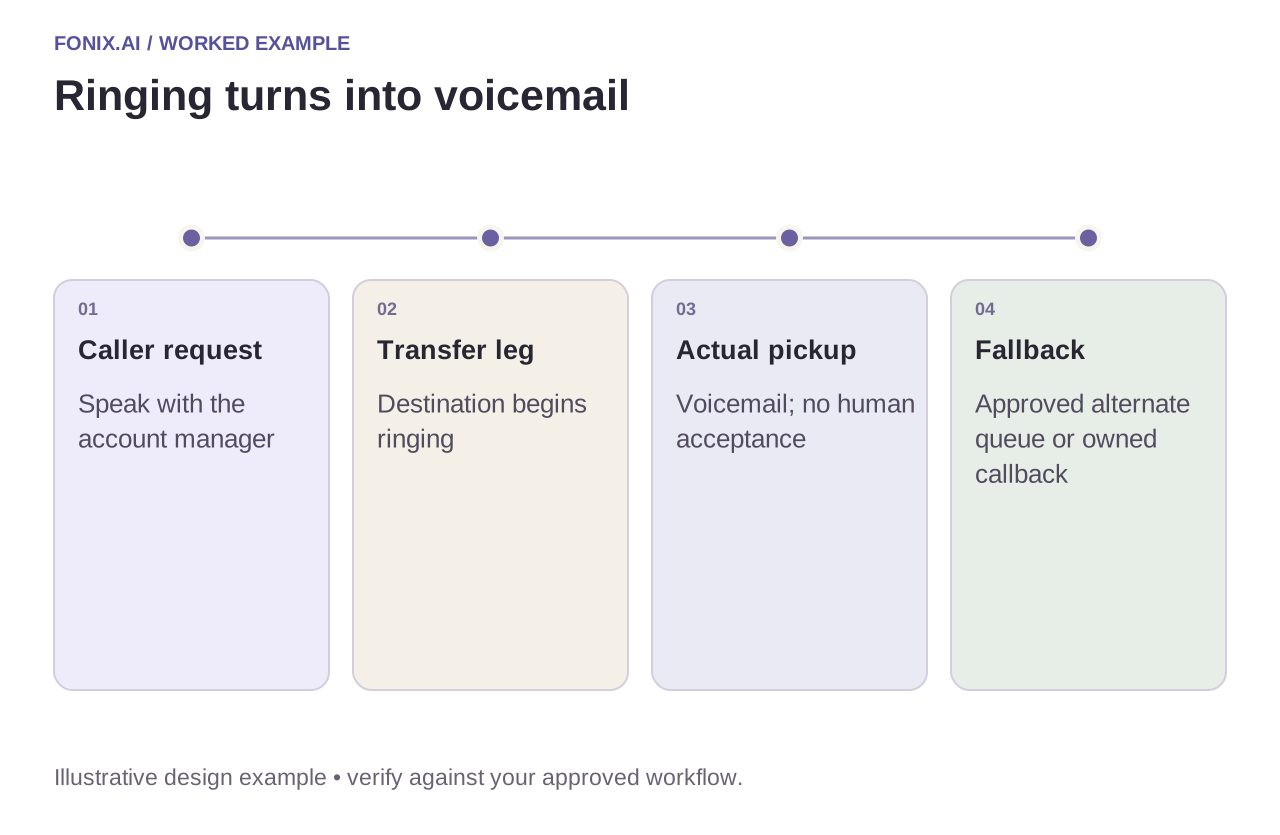
Worked example: an account manager does not answer
A fictional buyer asks for their account manager after a pricing discussion. The destination rings and then reaches voicemail. Unless the approved workflow treats voicemail as an acceptable destination, this is not an accepted human transfer. Offer the agreed alternate queue or record a callback with ownership.
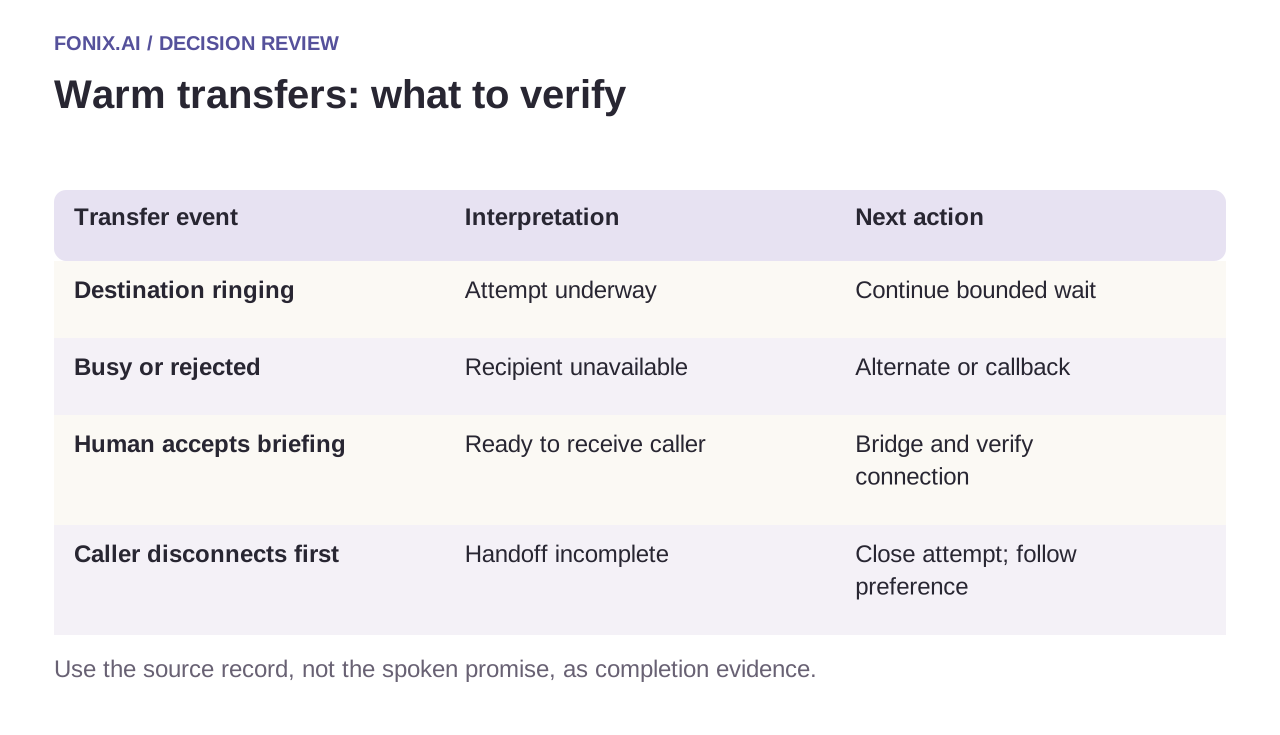
| Transfer event | Interpretation | Next action |
|---|---|---|
| Destination ringing | Attempt underway | Continue bounded wait |
| Busy or rejected | Recipient unavailable | Alternate or callback |
| Human accepts briefing | Ready to receive caller | Bridge and verify connection |
| Caller disconnects first | Handoff incomplete | Close attempt; follow preference |
Keep the original call and transfer legs linked
Preserve identifiers for the inbound leg, agent leg, destination attempt and bridge. A final hangup callback may arrive after an earlier status update. Reconcile events by their meaning and identifiers rather than overwriting everything with the latest arriving text.
If the bridge fails after the receiving person accepts, record the failure and give both parties an actionable next step where the call is still live. The brief should not claim that the customer heard an answer merely because the recipient spoke during consultation.
Evidence to collect at both ends of a transfer
Map approved destinations and opening times with the telephony owner. Specify what the recipient may hear, how long the caller waits and what happens on busy, voicemail or bridge failure. Test from both endpoints.
| Pilot case | Required behaviour |
|---|---|
| The account manager's number reaches voicemail | Keep human transfer incomplete unless voicemail is the explicitly approved outcome. |
| The recipient accepts but the bridge fails | Retain the accepted attempt and failed bridge as separate evidence and apply recovery. |
| The caller disconnects before acceptance | Close the live attempt and follow the caller's approved callback preference. |
Use accepted human connections divided by eligible requested transfers, with busy, voicemail, abandonment and bridge failures listed separately. Listen for unnecessary repetition after handoff as well as measuring the waiting interval.
Is a blind transfer the same as a warm transfer?
No. A blind transfer sends the call onward without the same consultation and acceptance process. A callback request is another distinct outcome. Confirm which path the provider and PBX actually support before choosing customer-facing terminology.
Test busy, voicemail and caller abandonment
Run each failure deliberately on the real telephony path. Listen from both endpoints and inspect the receiving record. Measure accepted human connections per requested transfer, waiting time and repeated explanations, keeping voicemail and callback outcomes separate.
Bring your destination map and carrier/PBX details to test a warm-transfer workflow. See SIP integration for signalling/media boundaries and customer support for the case record passed to the person.
If the receiving team works in a helpdesk, use the Zendesk ticket worksheet or Freshdesk case worksheet to define the record passed with the caller. These are integration-scoping guides; supported actions still need demonstration.