

A practical guide / Fonix.AI
Automated customer feedback calls: collect a reliable response and act on it
Workflows, exceptions and the questions to ask before deployment.
Collect a faithful response and act on it
Automated customer feedback calls ask a defined service cohort a consistent question, preserve the response and route issues that need follow-up. The goal is useful evidence about the experience, not simply a large number of ratings.
Fonix.AI supports business voice conversations in Indian languages. Evaluate the survey with your service-event source, question set and support process. Confirm the required cohort, record-writing and escalation connections for the deployment.
This page concerns post-service feedback. The customer-support guide covers resolving the original issue. If a survey reveals that the issue is still open, give it a support destination rather than treating the low rating as the final outcome.
Define the cohort and question before calling
Choose the event that makes a customer eligible: a delivered order, completed service visit or closed case. Preserve the event reference and time, then apply your contact preferences and duplication rules.
Do not survey a “completed” service without checking that the relevant source still agrees. A reopened ticket or cancelled visit may need a different conversation. Define how long after the event the survey runs and keep that interval stable during comparison.
Select the exact question, scale and wording before the pilot. Ask one thing at a time. “How satisfied were you with delivery and product quality?” combines two experiences and makes a single rating difficult to interpret.
Record the survey version and language. If the wording changes, the resulting ratings may not be directly comparable with the earlier version. Translations should preserve the concept and scale anchors rather than introduce praise or criticism.
Preserve the scale without suggesting an answer
Read the scale clearly and accept the customer's answer. Do not steer the caller towards a positive rating, reinterpret criticism as satisfaction or insist on a number when they decline.
| Response | What to capture | What to avoid |
|---|---|---|
| A valid rating | Raw answer and confirmed scale value | Adding an inferred reason |
| “Good, but delivery was late” | Qualitative response and separate delivery comment | Assigning a score without clarification |
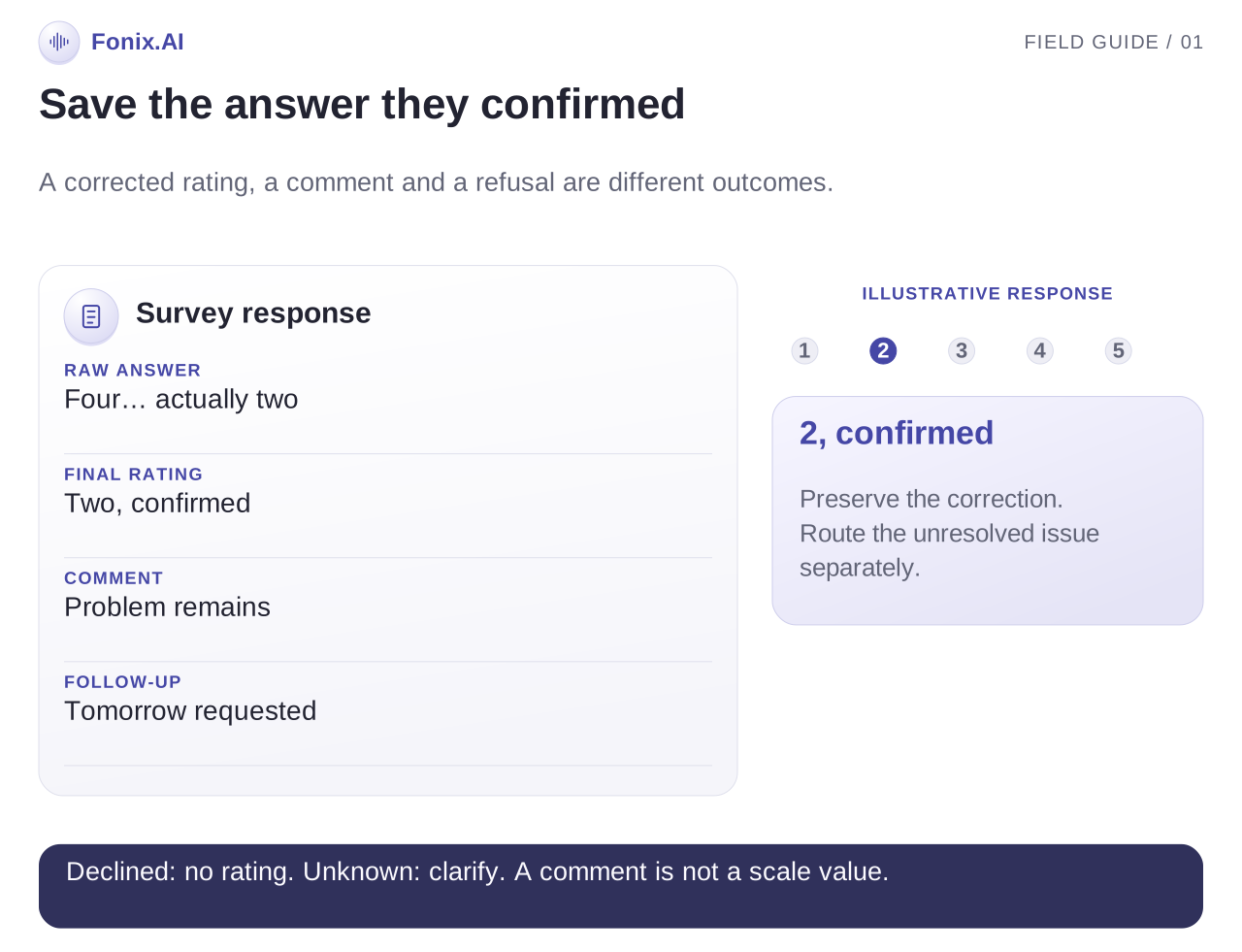
| A correction from four to two | The final confirmed value and correction | Keeping the earlier value |
| A value outside the scale | Ask a neutral clarification | Clamping automatically to the maximum |
| A refusal | Declined status | Treating refusal as a low score |
| No understandable answer | Unknown/incomplete status | Inventing a rating to finish the form |
If the customer gives a qualitative response, ask whether they want to choose a scale value. Preserve their words if they prefer not to. A complete comment with no rating can be useful without being counted as a completed numeric response.
Use readback when a critical value is uncertain. The multilingual guide describes task-level testing across language switches, numbers and corrections.
Separate feedback from complaint resolution
A survey may surface a missing parcel, unresolved service fault or request for a person. Capture the issue and send it to the appropriate support queue with the original event reference.
Keep the rating, comment, complaint and follow-up result as different fields. A complaint being assigned does not change the survey rating, and a high rating does not remove the need to resolve a specific problem.
Tell the customer the accurate next step. “I have requested a callback” is appropriate when only a task was created. “The issue is resolved” requires evidence of an actual resolution.
Define whether the survey should stop when an urgent unresolved issue appears. Continuing several satisfaction questions while the customer is asking for help can damage the experience you are trying to measure.
An illustrative rating correction
This fictional survey follows a completed service visit. Assume the approved question uses a one-to-five scale, with five as most satisfied.
Assistant: On a scale from one to five, where five means most satisfied, how satisfied were you with the service visit?
Customer: Four. Actually two, kyunki problem abhi bhi hai.
Assistant: I have recorded two as your corrected rating. You also said the problem remains. Would you like the service team to contact you about it?
Customer: Yes, tomorrow morning.
The record contains a final rating of two, the raw correction, an unresolved problem and a requested callback time. It should not count four as the answer or claim that a support booking is confirmed without a receiving task.
Suggested fields include service-event reference, survey version, language, raw response, confirmed rating, comment, completion status, complaint reference and receiving owner. These are workflow suggestions rather than a published Fonix API.
Review refusals, repetition and record quality
| Case | Expected behaviour |
|---|---|
| Duplicate service event | Avoid a second survey for the same eligible event |
| Ticket reopened before the call | Recheck eligibility and choose the appropriate flow |
| Customer gives an unclear number | Clarify neutrally or preserve unknown status |
| Customer refuses | Stop and record the preference |
| Complaint transfer fails | Create an owned follow-up rather than mark it resolved |
| Write result is unknown | Reconcile before submitting a duplicate response |
Review a sample of recordings against stored answers. Check whether the assistant changed the scale, added a leading phrase or lost a correction. Record quality matters before interpreting an average rating.
Report the denominator and response limits
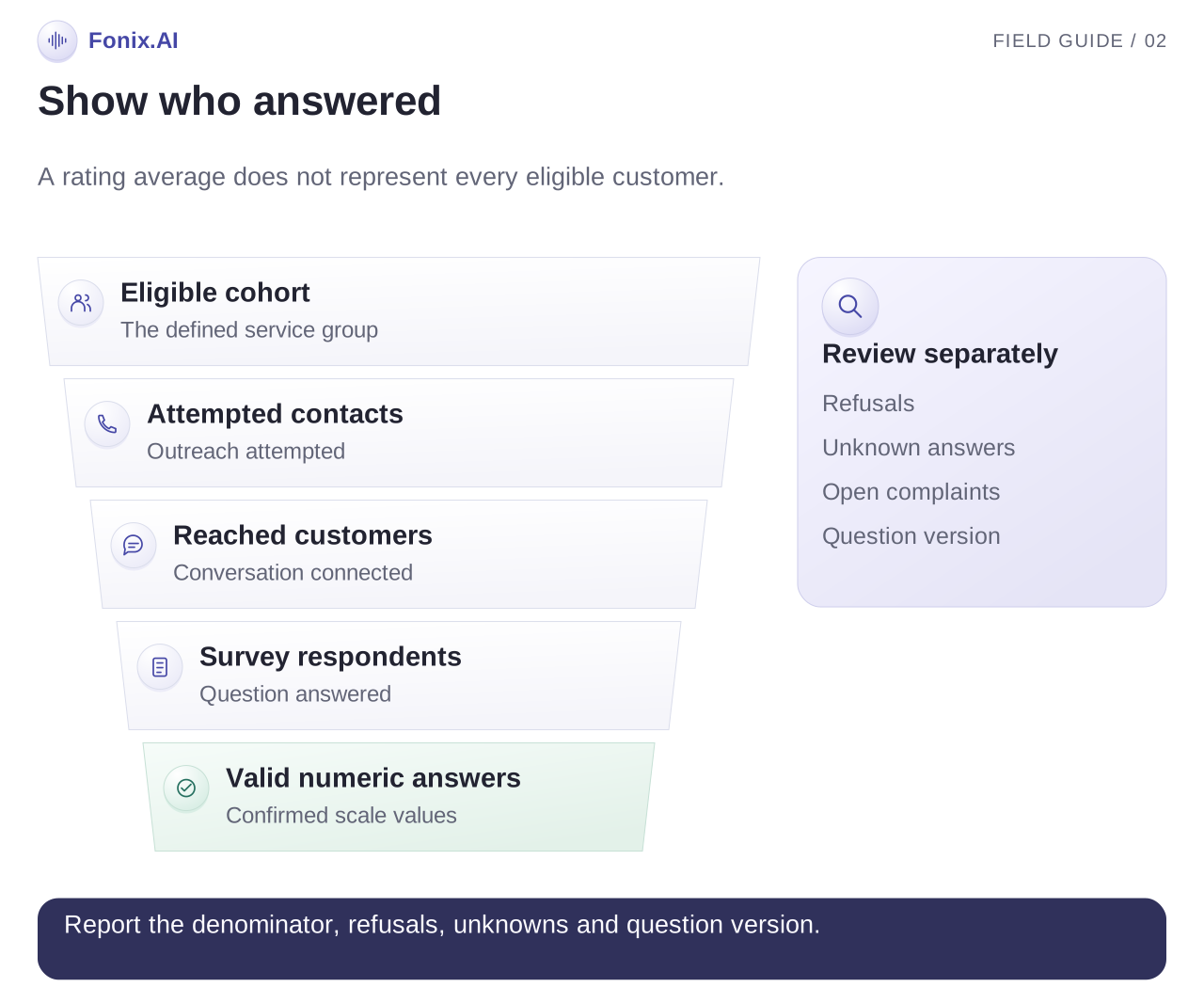
Show eligible customers, attempted contacts, reached customers, survey respondents and completed numeric answers separately. A rating average among respondents does not represent every eligible customer.
For a satisfaction percentage, define which valid ratings count as satisfied and divide by the valid answers to that question. Do not include refusals as negative answers or drop inconvenient low ratings. Keep incomplete and unknown responses visible alongside the metric.
Compare cohorts with similar service types, time since service, question versions and language mix. Changes in response rates can change the average even without a change in service quality. Track complaint acceptance and resolution time as separate operational outcomes.
Test one service cohort first
Bring a sample completed event, the exact question and scale, language variants and complaint-routing rules. Ask to see a refusal, a corrected score and a request for help during the survey.
Request a feedback-call evaluation to review the conversation and written record. Use the voice pricing guide to include survey and follow-up costs in your pilot.