
A practical guide / Fonix.AI
COD confirmation calls: an order decision workflow before dispatch
Workflows, exceptions and the questions to ask before deployment.
Give dispatch an explicit order decision
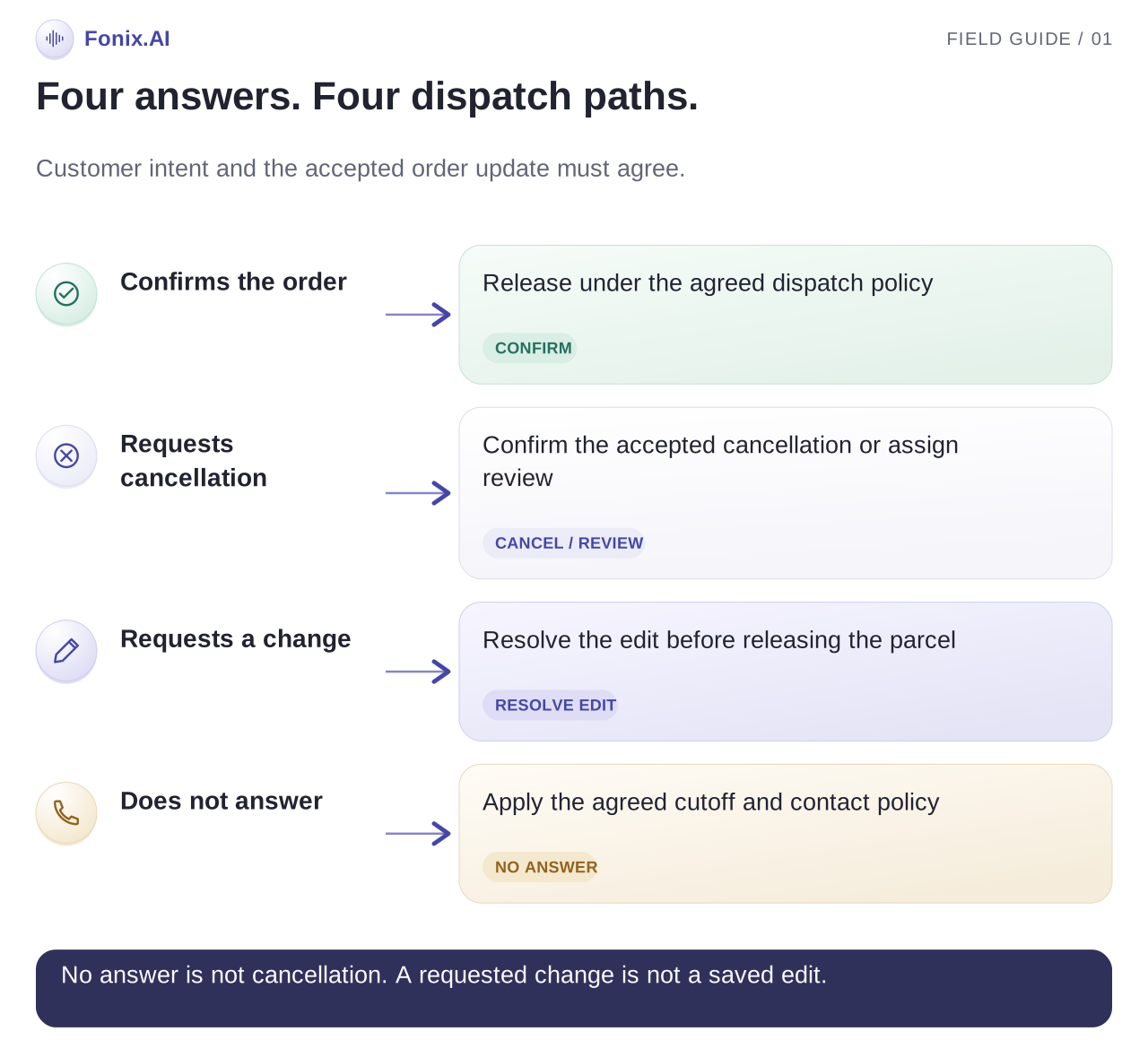
COD confirmation calls ask a customer whether they intend to receive a cash-on-delivery order and give them a way to correct details or cancel before dispatch. Automation is useful when the result becomes a clear order-system decision. A customer answering the phone is not the same as confirming the order, and silence is not a cancellation.
Choose a defined point between order creation and your dispatch cutoff. Read the current order before calling, explain the store and order context, confirm intent, then save one of the agreed outcomes. Keep “confirmed,” “cancel requested,” “change requested,” “unreachable” and “needs review” separate.
Fonix.AI supports calling workflows for Indian businesses. Its D2C use-case page describes the order-confirmation context. The workflow below is a design and evaluation plan; confirm the read and write capabilities of your particular order-system integration during a demo.
Decide which orders should receive a call
Avoid calling every order through every channel by default. Select orders according to your store's confirmation process, contact preferences and dispatch timing. Exclude cancelled, already-dispatched, already-confirmed and otherwise ineligible orders. Recheck eligibility just before the call, because a queued job can become stale.
If customers already confirm through a configured message flow, the voice workflow should read that result before making another attempt. Agree one shared decision record across channels. Independent voice and messaging lists can otherwise ask the customer to confirm an order they already confirmed.
Store an order reference and version with the job. A phone number is not an order identifier: the same customer can place two orders, and a household can share a number. Select the intended order explicitly rather than updating the latest order found for that number.
Establish a cutoff owner. What happens to an unconfirmed order when the warehouse deadline arrives? Your operations team should define the hold, review or dispatch policy. The assistant should not invent that commercial decision from the customer's tone.
Confirm the order without asking for unnecessary information
Identify the store and automated assistant, explain the order context and establish whether you are speaking with the intended customer before discussing personal details. Read only the fields necessary for confirmation, following the store's approved identity and privacy process.
Use the current product summary, amount due and delivery details from the order source. Ask whether the customer wishes to receive the order. Repeat the decision plainly, especially when the answer includes a correction or hesitation.
Do not ask for an OTP, card details or payment credentials as part of a COD confirmation conversation. If a customer wants a different payment method, use the store's approved route and a human handoff when required. A spoken promise to pay does not prove successful delivery or payment.
Here is an illustrative call for a fictional store and an example order amount:
Assistant: Hello, I am the automated assistant for Willow Store about your recent cash-on-delivery order. Is this a suitable time to confirm it?
Customer: Haan. Lekin address mein flat number galat hai.
Assistant: You would like to correct the flat number before dispatch. I will follow the store's address-change process. Shall I record this as a change request rather than confirm the current address?
Customer: Yes, please change first.
This is a change request, even though the customer still wants the product. Saving it as “confirmed” would hide the problem from dispatch.
Use a decision table your warehouse can understand
| Customer response | Suggested workflow state | Dispatch implication |
|---|---|---|
| Explicitly confirms the current order | Confirmed, after the update succeeds | Follow the store's release policy |
| Asks to cancel | Cancellation requested or cancelled, depending on permissions | Hold or review until the source system accepts the change |
| Requests a new address, size or quantity | Change requested | Apply the authorised edit process before release |
| Does not recognise the order | Needs review | Investigate the order and contact reference |
| Asks for a later call | Callback requested | Respect the requested time if it fits the cutoff policy |
| Does not answer | Unreachable | Follow the agreed attempt and dispatch policy |
| Gives an unclear answer | Needs review | Clarify once, then assign an owner |
These states are recommendations, not a claimed Fonix API response format. Map them to the actual statuses your store uses. A connector with read access but no cancellation permission cannot truthfully promise that it has cancelled an order.
Keep retries from overwriting a newer decision
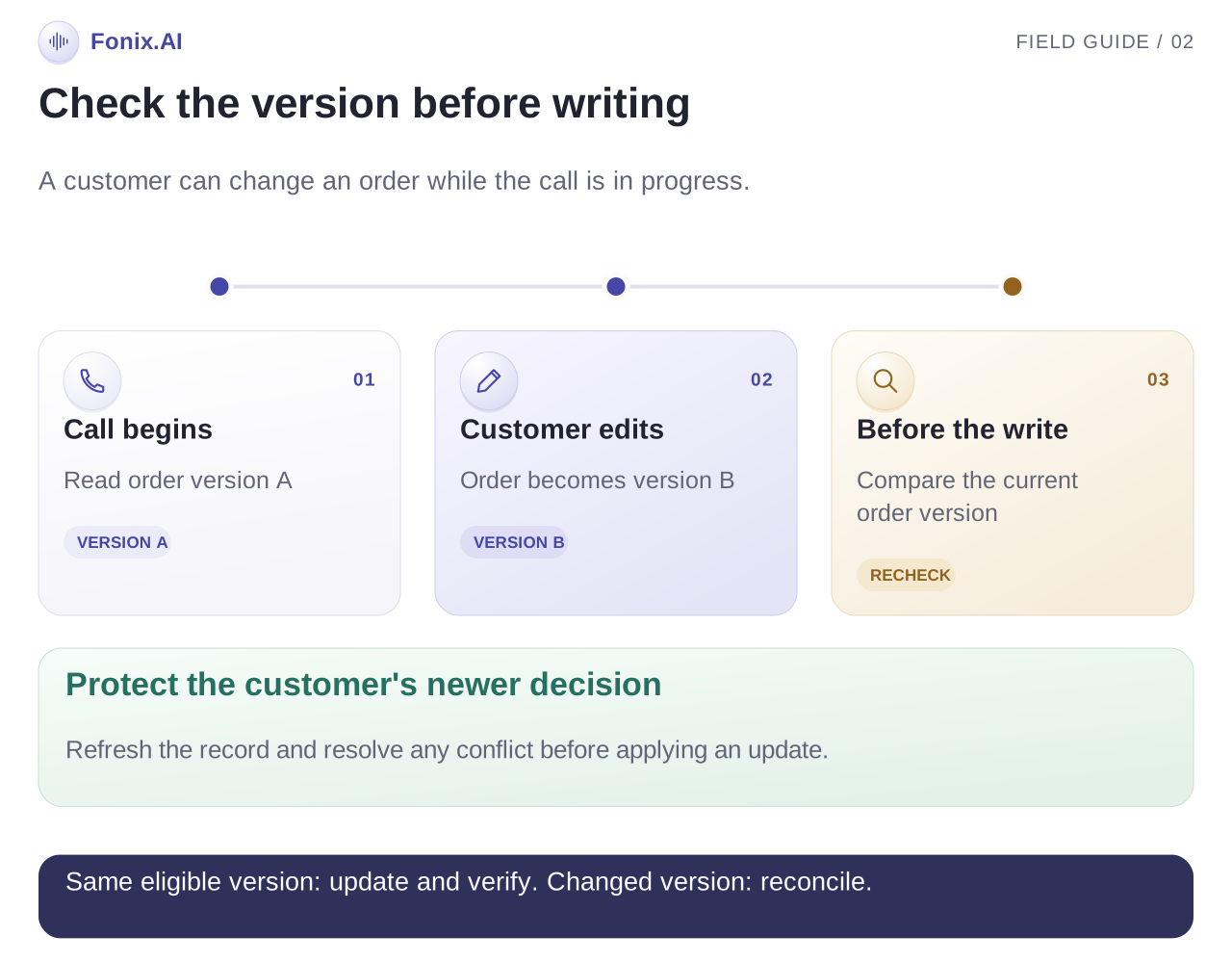
Before writing a result, recheck order version, status and dispatch state. A customer may edit or cancel the order on the website during the call. If the record changed, refresh it and resolve the conflict under your team's policy.
Use an operation reference for each intended update. If a timeout leaves the result unknown, query that operation or the order status before retrying. Repeating the same write blindly can create duplicate tasks or overwrite a later customer action.
For an integration being designed, a useful rule is: apply the decision only if the order is still eligible and the expected version matches. If the order system cannot enforce that condition, agree a review mechanism that addresses the race. Discuss the available API behaviour with the team implementing the connection.
Record the attempted action and confirmed source-system result separately. An assistant saying “I have cancelled it” is not evidence of a successful cancellation. The final customer wording should follow the actual result, with a review request explained when completion is uncertain.
Test the awkward cases before increasing volume
| Test | Expected behaviour | Evidence to inspect |
|---|---|---|
| Two COD orders use one number | The intended order is selected | Order reference in the job and outcome |
| Customer changes address mid-call | A change request remains visible | Updated version and dispatch hold or review |
| Cancellation write times out | Check status before retrying | Operation reference and final state |
| Order dispatches while queued | Stop the pre-dispatch confirmation path | Fresh eligibility lookup |
| Customer confirmed on another channel | Avoid a redundant confirmation attempt | Shared confirmation state |
| Customer asks to stop calls | Apply the agreed contact preference | Suppression across later job creation |
Also test amounts spoken in mixed language, product names that sound alike and a customer interrupting the address readback. The multilingual evaluation guide shows how to review critical fields rather than fluency alone.
Measure delivered outcomes without claiming every change as savings
Measure confirmation decisions before cutoff, manual-review completion, incorrect updates and order changes resolved before dispatch. Keep unreachable orders distinct from cancelled orders so the warehouse can see the actual workload.
For delivery analysis, follow a cohort of eligible COD orders from confirmation through dispatch and final delivery status. Calculate return-to-origin outcomes against the same dispatched cohort, and segment by campaign, product, service area and confirmation method where useful. A confirmation call cannot fix every logistics or delivery problem.
Compare equivalent periods or a well-defined pilot group. Include telephony, model use, integration work and manual review in the cost assessment. A reduction in calls handled by staff is not automatically a reduction in total operating cost.
Bring the dispatch policy into the demo
Bring a sample order, your current statuses, edit permissions, contact policy and cutoff rules. Request demonstrations of explicit confirmation, a changed address, a cancellation timeout and an already-dispatched order. Inspect the order system after each conversation.
Request a COD confirmation demo. For post-purchase enquiries, use the customer support voice workflow; for broader software evaluation, read the AI calling software guide.